Fundamental to the value of Veritone's AI Processing is the ability to ingest and process data with a set of engines in an order defined by the user. A single end-to-end processing of a workflow defined by a user is called a job. Every job is made out of 1-N tasks; each task is implemented by 1-N instances of a specific type of engine. This topic describes how a job is processed by AI Processing.
Job processing flow: DAGs
Each job is represented by a Directed Acyclic Graph (DAG) that defines the path along which data will flow from ingestion to final engine execution. Each node on the graph is a task and represents an engine (or adapter) on AI Processing. Each output of one engine can become the input of another. This is called chain cognition and requires engines to adhere to a standard data format for ingestion and output. Engines that support Veritone's AION standard become interoperable within a class with given capabilities.
Each job is associated with a static DAG, defined a priori to execution on AI Processing; however, the architecture and AI Processing APIs also supports dynamic DAGs (modified during runtime, while the data is being routed through the DAG).
A route is defined by a JSON payload for serialization and communication between services. The AI Processing subsystem in charge of job processing is the controller.
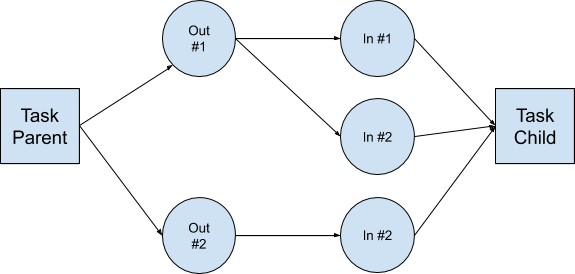
To process a job DAG, each task requires 0-N inputs from previous tasks or from an external source. All data needed for executing a job is kept in the file system.
Each task in the DAG is associated with one of the following:
- Input folders: Where the task gets the data to process.
- Output folders: Stores the chunks generated by the task.
- Child input folders: Used by the next task on the DAG.
DAG constraints
- Stream > chunk, chunk > stream processing: Must be serial, meaning performed in a single engine instance.
- Stream > stream processing: Must be serial, meaning performed in a single engine instance.
- Chunk > chunk processing: Can be serial or parallel, or performed in multiple instances of the same engine. Adapters by definition ingest chunks or streams from external sources and therefore may run as root nodes or child nodes. Engines may never run as root nodes of a DAG except for batch engines.
Execution preferences
You can set these optional Execution Preferences at the task level in the createJob mutation:
| Name | Type | Description |
maxRetries | Integer | The maximum number of retries for this task. Default: 1 |
maxEngines | Integer | The maximum number of engine instances that can be devoted to the task. |
parallelProcessing | Boolean | Defines if the task can be processed in parallel. Default: false. |
dueDateTime | DateTime | The due date, if any, for this task. Informational only. Doesn't affect task processing. |
parentCompleteBeforeStarting | Boolean | Defines if the parent task must be completed before starting. Default: false. |
priority | Integer | This number can range from -2^31 to 2^31, with the lowest values having the highest priority. Default: 0. See recommended usage guidelines in the table below. |
Task priority guidelines
| Type | Priority | Notes |
| Ingestion (TVR, WSA) | -100 | |
| Application jobs | -20 | Anything touching end users should be before normal ingestion | |
| Tier1/High ingestion | -10 | |
| High priority ingestion | 0 | Normal |
| Tier3/Low ingestion | 10 | Bulk low priority ingestion |
| Archive/Bulk processing | 50 | |
Task processing flow
Jobs are composed of tasks. Each task is associated with an engine.
The Engine Toolkit sits between the controller and the various running engine instances. The Engine Toolkit communicates directly to engines and manages their inputs and outputs. How ET interacts with engines is outlined below:
-
Engine Toolkit: Scan the input folder for up to X items with .IN or .P (skip .ERROR and .DONE). X is passed in by the controller.
-
If a file has a .P modifier that means it's being processed by another instance, check:
- If the "modified" time is more than the configured length of processing time. This means the current attempt to process has failed. The default time is 90 seconds.
[Note] Engines should touch a file at a heartbeat interval, so that the timestep isn't dependent on the length of time an engine takes to do its work. Rename the file back to .IN. Keep # as the number of retries; this number will increment during the processing step as usual. If the rename fails, drop the file from the internal memory list, because a different engine instance renamed it. If the # is greater than the max retries, rename the file to .ERROR
- If the rename succeeded, update the controller so this message/chunk is errored out, and drop it from the memory list.
- If the rename fails, drop the file from the memory list because another engine renamed it.
-
If parallel mode, shuffle the X items in the modified list from step 1.
-
Engine Toolkit: Select the top file from the list and send the chunk to the engine managed by the Engine Toolkit. If no items are on the list, return to Step 1. Rename from .IN.# to .P.[#+1]. If the rename fails, skip the file and drop it from the work list.
-
Engine: Process the chunk
- Success: Engine sends output to Engine Toolkit via Engine Toolkit API over HTTP
- Error: Engine sends back error on processing
- Engine is no longer responsive: Engine Toolkit fails, notifies controller, renames from .P.# to .IN.[#+1], and then terminates itself.
-
Engine Toolkit:
If successful and there's an output:
- Use the file naming conventions
- Write the .OUT.TMP file to Output Folder (ctrl? Is TMP valid?)
- Write the .DATA file
- Rename .OUT.TMP to .OUT
- Hard link .OUT to the Child Input Folder(s) as .IN
- Hard link .DATA to the Child Input Folder(s)
- Rename .P (or .P.#) to .DONE
If there's an error:
- Rename .P.# to .ERROR
- Write .ERROR.DATA, include Error Code, Reason & Detail
- If cumulative errors is greater than N passed in by the controller.
[Note] N has to be higher than the max retry count for the .P's, as we are trusting Engine Toolkit, not the underlying engine, and suspect errors are being caused by the underlying engine behaving poorly.)
- Move all .ERRORs as reported by InternalEngine to .IN.# so they can be retried (but only if .# is less than max retries
- Notify the controller of too many errors reached: Error count > N
- The controller tells the engine to die and marks the database that the engine instance was killed for error > N reason. The Engine Toolkit may or may not comply with this request from the controller.
- The Engine Toolkit fails to die: When the server agent checks in and the instance of the bad engine is still alive, the controller responds and tells the server agent to kill the container and to relaunch a new one.
- The Engine Toolkit dies properly: When the server agent checks in, the controller validates that engine died and instructs the server agent to start another process.
- After the cumulative errors on a specific input directory on the job (as a % or #), then the task has failed. At the DAG level, metadata tells the controller what to do when this happens. For example: Stop all processing for this DAG, continue processing, notify application, etc.
-
Engine Toolkit:
- If there are additional items still on the list, return to step 2 above.
- If there are no more items on the list, return to step 1 above.
Creating jobs
The information below helps construct jobs to run on your local AI Processing instance.
Engines
| engine | id | notes |
| WSA (regular) | 9e611ad7-2d3b-48f6-a51b-0a1ba40feab4 | official WSA |
| WSA2 (test) | 9e611ad7-2d3b-48f6-a51b-0a1ba40fe255 | for testing WSA |
| TVR (regular) | 74dfd76b-472a-48f0-8395-c7e01dd7fd24 | official TVR |
| TVR2 (test) | 74dfd76b-472a-48f0-8395-c7e01dd7f255 | test version |
Test URLs
Query variables
Set the query variable clusterId in the query variables and use that with these GraphQl mutations/queries.
Example:
{
  "jobId": "19124905_meVau2vXDi",
  "clusterId" :"rt-1cdc1d6d-a500-467a-bc46-d3c5bf3d6901"
}
createJobForEdge
This is for using the WSA2 (WebStream Adapter 2), with audio chunks to Speechmatics.
JobDAG
Supported in V3 AI Processing
WSA ----> SI Playback (to store HLS segments for playback and primary media to the TDO )
   |---> SI FFMPEG to cut into audio chunks ---> Cognitive engines
Example
mutation createJobForEdge{
 createJob(input: {
   target: {
     startDateTime:1574311000
     stopDateTime: 1574315000
   }
   clusterId :"rt-242c1beb-653a-4299-bb33-2d8fb105d70b"
   tasks: [
      {
        # webstream adapter
        engineId: "9e611ad7-2d3b-48f6-a51b-0a1ba40fe255"
        payload: {
#         url:"https://src-veritone-tests.s3.amazonaws.com/stage/20190505/r32_00_redactTest_axon.mp4"
 #        url:"https://src-veritone-tests.s3.amazonaws.com/stage/20190505/1_23_SampleVideoFile.mp4"
         url:"https://s3.amazonaws.com/src-veritone-tests/stage/20190505/0_40_Eric%20Knox%20BWC%20Video_40secs.mp4"
#          url: "https://s3-us-west-2.amazonaws.com/lblackburn-test-data/bodycam_test.mp4"
        }
      },
     {
       engineId: "352556c7-de07-4d55-b33f-74b1cf237f25" # playback
     },
     {
       engineId: "8bdb0e3b-ff28-4f6e-a3ba-887bd06e6440" # chunk audio
       payload:{
         ffmpegTemplate: "audio"
         chunkOverlap: 15
         customFFMPEGProperties:{
           chunkSizeInSeconds: "30"
         }
       }
     },
     {
       # engine to run
       engineId: "c0e55cde-340b-44d7-bb42-2e0d65e98255"
     }
   ]
 }) {
   targetId
   id
 }
}
Create job for stream engine
WSA ----> SI Playback (to store HLS segments for playback and primary media to the TDO)
   |---> SI FFMPEG to stream ---> Cognitive stream engines
Using the Google Speech to Text stream engine as an example, this mutation shows a job feeding data into the stream engine. Note the parent task FFMPEG's payload which is a custom ffmpeg, outputMode = stream and the ffmpeg command is purely to mp3 for transcription. Don't forget the - at the end, which is for ffmpeg to output to stdout
         outputMode: "stream"
         ffmpegTemplate: "custom"
         customFFMPEGTemplate: "ffmpeg -i pipe:0 -f mp3 -"
Example:
## stream engine
mutation createGSTTJobForEdge{
 createJob(input: {
   target: {
     startDateTime:1574311000
     stopDateTime: 1574315000
   }
   # TODO your own Cluster ID --
   clusterId :"rt-242c1beb-653a-4299-bb33-2d8fb105d70b"
   tasks: [
      {
        # webstream adapter
        engineId: "9e611ad7-2d3b-48f6-a51b-0a1ba40fe255"
        payload: {
 #        url:"https://src-veritone-tests.s3.amazonaws.com/stage/20190505/1_23_SampleVideoFile.mp4"
         url:"https://s3.amazonaws.com/src-veritone-tests/stage/20190505/0_40_Eric%20Knox%20BWC%20Video_40secs.mp4"
        }
      },
     {
       engineId: "352556c7-de07-4d55-b33f-74b1cf237f25" # playback
     },
     {
      ## just a straight ffmpeg copying from WSA to SI ffmpeg then to engine
      ## TODO: optimization for WSA to go straight to engine...
       engineId: "8bdb0e3b-ff28-4f6e-a3ba-887bd06e6440" # chunk audio
       payload:{
         outputMode: "stream"
         ffmpegTemplate: "custom"
         customFFMPEGTemplate: "ffmpeg -i pipe:0 -f mp3 -"
       }
     },
     {
       # engine to run - Google STT v3f
       engineId: "f99d363b-d20a-4498-b3cc-840b79ee7255"
     }
   ]
 }) {
   targetId
   id
 }
}
Stream engines
WSA ---> Cognitive engines (stream engines)
Example:
mutation reprocessTDOWithStreamEngine{
 createJob(input: {
   clusterId :"rt-242c1beb-653a-4299-bb33-2d8fb105d70b"
   tasks: [
      {
        # webstream adapter
        engineId: "9e611ad7-2d3b-48f6-a51b-0a1ba40fe255"
        payload: {
          url:"https://api.veritone.com/media-streamer/stream/790018125/dash.mpd"
        }
      },
     {
       # Google STT
       engineId: "f99d363b-d20a-4498-b3cc-840b79ee7255"
     }
   ]
 }) {
   targetId
   id
 }
}
Chunk engines
SI FFMPEG ---> Cognitive engines (chunk engines)
Example
mutation reprocessTDOWithChunkEngine{
 createJob(input: {
   clusterId :"rt-242c1beb-653a-4299-bb33-2d8fb105d70b"
   tasks: [
     {
       engineId: "8bdb0e3b-ff28-4f6e-a3ba-887bd06e6440" # chunk audio
       payload:{
         url: "https://api.veritone.com/media-streamer/stream/790018125/dash.mpd"
         ffmpegTemplate: "audio"
         customFFMPEGProperties:{
           chunkSizeInSeconds: "30"
         }
       }
     },
     {
       # engine to run
       engineId: "c0e55cde-340b-44d7-bb42-2e0d65e98255"
     }
   ]
 }) {
   targetId
   id
 }
}
Create job for processing non-media files
WSA ----> SI Asset creator (to store the asset to the TDO)
   |---> Cognitive engines
Example:
mutation createTextJobForEdge{
 createJob(input: {
   target: {
     startDateTime:1574311000
     stopDateTime: 1574315000
   }
   clusterId :"rt-242c1beb-653a-4299-bb33-2d8fb105d70b"
   tasks: [
      {
        # webstream adapter
        engineId: "9e611ad7-2d3b-48f6-a51b-0a1ba40fe255"
        payload: {
           url: "https://fran-test-rt.s3.amazonaws.com/cbc_news.txt"
        }
      },
     {
       # siV2 Asset
       engineId: "75fc943b-b5b0-4fe1-bcb6-9a7e1884257a"
      },
     {
       # engine to run
       engineId: "374fab67-7726-4df1-b087-8878f1de206b"
     }
   ]
 }) {
   targetId
   id
 }
}
Reprocessing jobs for processing non-media files
WSA ----> SI Asset creator (to store the asset to the TDO)
   |---> Cognitive engines
Example:
mutation reprocessingTextJobForEdge{
 createJob(input: {
   clusterId :"rt-242c1beb-653a-4299-bb33-2d8fb105d70b"
   tasks: [
      {
        # webstream adapter
        engineId: "9e611ad7-2d3b-48f6-a51b-0a1ba40fe255"
        payload: {
           url: "TBD to get the primary asset"
        }
      },
     {
       # engine to run
       engineId: "374fab67-7726-4df1-b087-8878f1de206b"
     }
   ]
 }) {
   targetId
   id
 }
}
Create job for batch engines
Simple Job DAG:
batchEngine
Example:
mutation createBatchJob{
 createJob(input: {
       target: {
     startDateTime:1574311000
     stopDateTime: 1574315000
   }
   # TODO your own Cluster ID --
   clusterId :"YOUR CLUSTER"
   tasks: [
      {
       # your batch engine id and payload
       engineId:"cbaea878-d947-4ee1-933c-664bb704204d"
     }]}) {
   id
   tasks{
     records{
       id
       engineId
       status
     }
   }
 }
}
myEdgeJobs
query myEdgeJobs($clusterId:ID) {
 jobs(clusterId:$clusterId){
   records{
     id
     targetId
     tasks {
       records{
         id
         engineId
         status
         taskPayload
         taskOutput
       }
     }
   }
 }
}



