Machine Box APIs are standard RESTful JSON/HTTP endpoints, making them very easy for developers of all levels.
Box specific APIs
Each box ships with its own unique API tailored to the specific needs of particular problems. To access the documentation, you need to spin up the box on your local development machine and visit the Interactive console that is served from inside the box.
For a real example, follow the Facebox tutorial.
Basic authentication
If the boxes are going to be publicly accessible, it is recommended that you protect them by providing a username and password, which must be included in every request to the box.
You do this by spinning up the box with the following additional environment variables:
docker run -e "MB_BASICAUTH_USER=username" -e "MB_BASICAUTH_PASS=password" ...
All requests to the box must now include the Basic Authentication HTTP header, otherwise they will receive a 401 Unauthorized response.
Authorization: Basic base64EncodedString
base64EncodedString - (string) The username and password base64 encoded as per the Basic access authentication specification following the format: username:password- Most HTTP clients provide a way to set these credentials without having to worry about encoding
- Encoding the credentials into the URL is deprecated and therefore not supported
/info endpoint
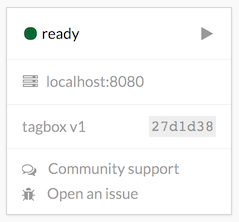
All boxes provide the /info endpoint which returns some basic details about the box:
GET /info
{
  "success": true,
  "name":    "tagbox",
  "version": 1,
  "build":   "27d1d38",
  "status":  "ready",
  "plan": "pro"
}
success - (boolean) Whether the /info request was successful or notname - (string) The name of the boxversion - (number) The version of the boxbuild - (string) The code that describes the exact build of the box (useful when reporting issues)status - (string) The status of the boxplan - (string) The subscription plan (influences which features are available and any limits that might apply)
Box status
Valid box status values include:
starting... - The box is starting up and will be ready shortlyready - The box is ready to receive API calls (wait for this before making requests)shutting down - The box is shutting down and will be unavailable soon Once a box has shut down, the /info endpoint stops working, at this point the Interactive consoles will show unavailable.
success and error handling
All Machine Box APIs return a single JSON object that have a success field, and may have an error field, allowing you to write failure logic once, and reuse it. For a successful response, you will get:
{
  "success": true,
  // some other data
}
If something goes wrong, success will be false and the error field will be provided explaining what happened:
{
  "success": false,
  "error": "url must be absolute"
}
Submitting files
If a box endpoint requires a file, you have three main ways of submitting one:
- POST the file directly (like uploading from an HTML form)
- Submit an absolute URL to a file, which will be downloaded and processed
- Encode the file with Base 64 encoding and POST the string
The Interactive console for each box provides more details on how to do this in each case.
Health endpoints
All Machine Box boxes support various health endpoints to assist with deployment and operations.
/healthz endpoint
GET /healthz
Boxes will reply with a JSON payload indicating the health of the box:
{
  "success": true,
  "hostname": "83b1a33ef322",
  "metadata": {
    "boxname": "facebox",
    "build": "18f2361"
  },
  "errors": [{
    "error": "Something went wrong",
    "description": "Something went wrong"
  }]
}
hostname - The host of the boxmetadata.boxname - The name of the boxmetadata.build - The build tag of the boxerrors - An array of any errors indicating bad healtherrors[].error - An error string indicating a problemerrors[].description - A description of what went wrong
/liveness endpoint
The /liveness endpoint can be used to check that the box is alive, and responding. It replies with a very simple 200 OK response.
/readyz endpoint
GET /readyz
Boxes will reply with 503 Service Unavailable if the box status is not ready, otherwise a 200 OK response will be sent.
Common data types
All Machine Box APIs use various data types to describe data. This section highlights some interesting types and how best to use them.
Duration
A duration string is a possibly signed sequence of decimal numbers, each with optional fraction and a unit suffix, such as 30m, 1.5h or 2h45m. Valid time units are ns, us (or 's), ms, s, m, h.
Examples:
10m - Ten minutes2h - Two hours2h30m or 2.5h - Two and a half hours24h - One day168h - One week



