This topic describes how to create a Microsoft Entra ID OpenID Connect Provider using GraphQL. (Alternately, you can create the OpenID Connect Provider using the UI. See Implement SSO using Admin Center.)
Before you begin
You need the values from Collect app, OpenID, and client values from Microsoft Entra ID.
Steps
- Login to your Veritone account using your org admin credentials, then go to Veritone's GraphQL interface (use the domain of the environment you are logged into, if not
us-1). - In the following mutation, replace the values of clientId, clientSecret, and issuerUrl with the values from Collect app, OpenID, and client values from Microsoft Entra ID:
  mutation {
  createOpenIdProvider(
        input: {
              name: "Microsoft Entra ID SSO"
              description: "Microsoft Entra ID Connect"
              websiteUrl: "https://login.microsoftonline.com"
              clientId: "<YOUR CLIENT ID>"
              clientSecret: "<YOUR CLIENT SECRET>"
              issuerUrl: "<YOUR OPENID CONNECT METADATA DOCUMENT>"
              isGlobal: false
        }
        ) {
              id
              name
              description
              websiteUrl
              loginUrl
              loginButtonStyle {
              }
              isGlobal
        }
  }
The response looks like this:
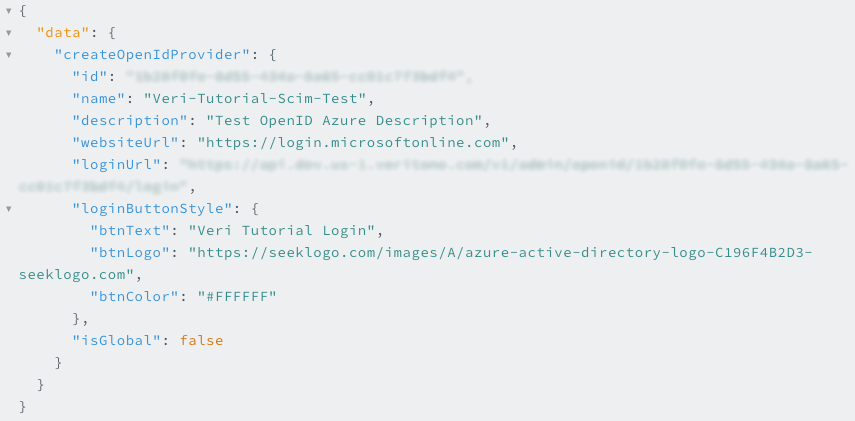
- Copy the ID and the loginUrl that are returned from GraphQL and save them.
Next step
Configure a platform in Microsoft Entra ID



