This user guide covers the basic, raw format of a GraphQL API request, and how to use GraphQL variables.
This guide assumes that you know what GraphQL is and understand terms like schema, type, field, mutation, and query, and are ready to start using the Veritone APIs.
Also see:
This page includes examples using curl, Postman, Javascript, and Python.
Every request is an HTTP POST.
Two types of requests are accepted: plain JSON and multipart form POST. For most requests you'll use plain JSON. Multipart form POST is useful for mutations that accept a file upload.
To make a plain JSON request:
- Use HTTP POST.
- Set the
Content-Type header to application/json - Most operations require authentication. If authenticating, set the
Authorization header to Bearer: <your token>. - The request body must contain valid JSON. The JSON must contain a
query element, with a string value containing the GraphQL query. - Optionally, you can include a
variables element with a map of variable values referenced in the query.
Tools like curl or wget are often used to demonstrate how to use REST APIs. With typical REST APIs, this is essential because every operation has a different URL format and request payload. In a GraphQL API, every request is the same. Thus, you can use curl to demonstrate the basic structure of a request.
However, once this basic structure is understood, curl is an awkward tool for exploring GraphQL APIs. Use the Sandbox instead.
console$ curl https://api.veritone.com/v3/graphql \
>   -H 'Authorization: Bearer <id>' \
>   -H 'Content-Type: application/json' \
>   -X POST \
>   -d '{ "query":" query { asset(id: \"<an asset ID>\") { id assetType } }" }'
Note that:
- The
Authorization header is used for authentication - The
Content-Type header is set to application/json - HTTP POST is used - The request body contains JSON.
- That JSON has a single element,
query - The value of
query is a string containing the GraphQL query. - Since the request body must parse as valid JSON, it must all be on one line and be properly escaped (note the escaped double quotes).
The API returns plain JSON:
{"data":{"asset":{"id":"<your asset ID>","assetType":"transcript"}}}
You can also use the multipart form POST request format. The response and the way authorization is sent are exactly the same. For manual testing a form request can be a little easier to format since the GraphQL query is sent directly in the query form field instead of embedded in JSON. Note that double quotes inside the GraphQL query in this format do not have to be escaped.
curl -v \
>  -H 'Authorization: Bearer <token>' \
>  https://api.veritone.com/v3/graphql \
>  -F query='query { asset(id: "<an asset ID>") { id assetType } }'
Here's an example of a basic request in Postman. First, set the Authorization header using a valid token:
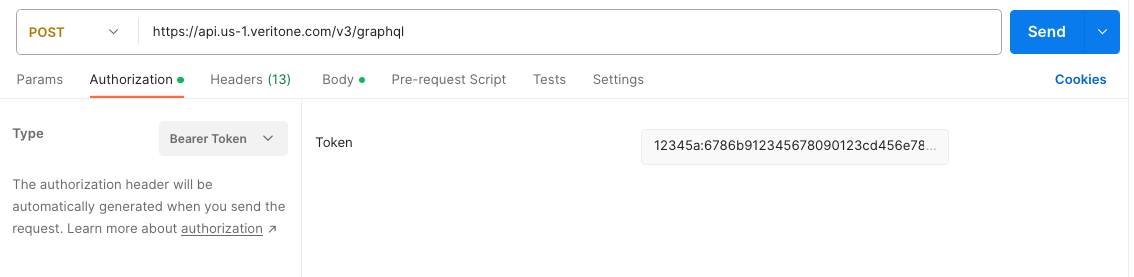
Then, send the GraphQL query using multipart form post:

Using GraphQL variables
It is often convenient to write GraphQL queries using variables to inject parameterized values, such as the asset ID in the example above. To do so you must declare the variable in the query signature, and after that you can reference it within the query body. The GraphQL server handles any parsing or formatting of the variable value, as long as a value of the right type is provided. The type (ID!) in the variable declaration must match the type where it is used (the id parameter on asset, which is ID!).
Here's the rewritten query:
query assetById($assetId: ID!) {
  asset(id: $assetId) {
    id
    assetType
  }
}
The client then provides variable values in a separate JSON object. Here is the curl example:
console$ curl https://api.veritone.com/v3/graphql \
>   -H 'Authorization: Bearer <token>' \
>   -H 'Content-Type: application/json' \
>   -X POST \
>   -d '{ "query":" query byId($assetId: ID!) { asset(id: $assetId) { id assetType } }", "variables": " {\"assetId\":\"<your asset ID>\"}" }'
If the request is not formed correctly, you'll receive a 400 error back from the GraphQL server. The error message will indicate the problem.
Typical causes include:
- An invalid or unspecified content type was included.
- The request body does not contain valid JSON with a
query element. - The string value of the
query element is not escaped properly. - The string value of the
query element does not contain a valid GraphQL query. - Variables are referenced in the query but not properly declared or sent in the
variables parameter.
See Handling file upload errors for more information about resolving. Here's a Postman sample query using variables:
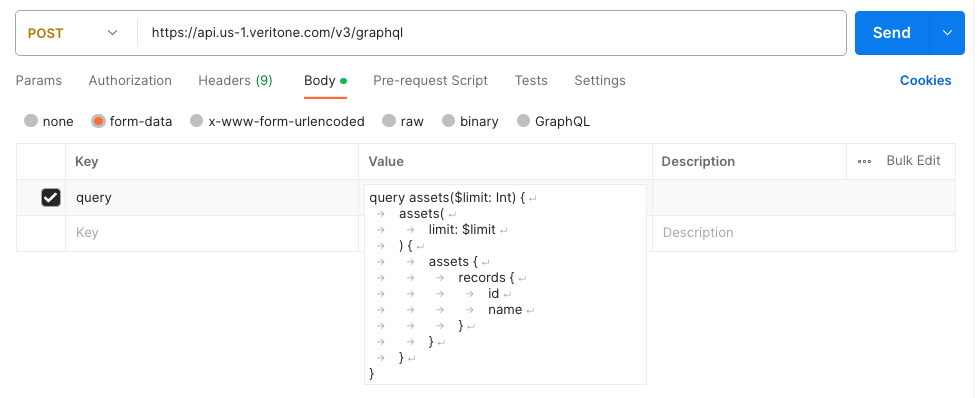
And here, bind the variable values:
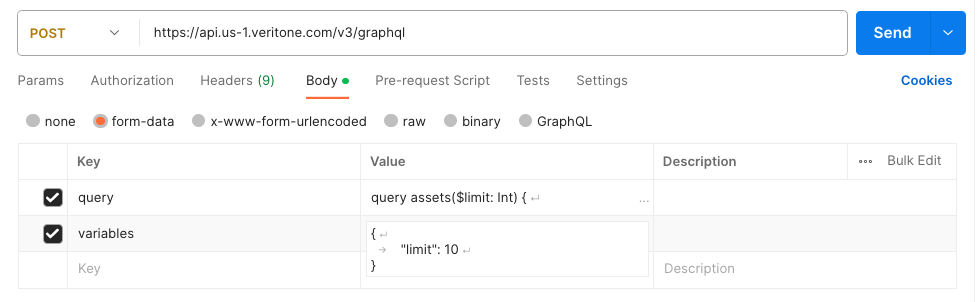
Uploading files with multipart form post
The GraphQL server also accepts multipart form post requests as described above. You can submit plain queries this way if convenient, but the primary purpose of the method is to support file upload for mutations that accept them. Here is a curl example:
curl -v \
>  -H 'Authorization: Bearer <token>' \
>  https://api.veritone.com/v3/graphql \
>  -F query='mutation create($containerId: ID!, $assetType: String!) { createAsset(input: { containerId: $containerId, assetType: $assetType}) { id }}' \
>  -F variables='{ "containerId": "<your TDO ID>", "assetType": "<your asset type>" }' \
>  -F file=@<path of file to upload>
Note the following differences when using multipart form post:
- The GraphQL query is provided as a plain string parameter (it is not embedded in JSON).
- Variables are defined in a JSON object (exclude this parameter if your query does not use variables).
- A single
file element contains the file to upload. This convention is used across all Veritone GraphQL APIs that accept a file upload. - All other aspects of the request — URL, HTTP method, authentication, etc. — are the same as a plain JSON request.
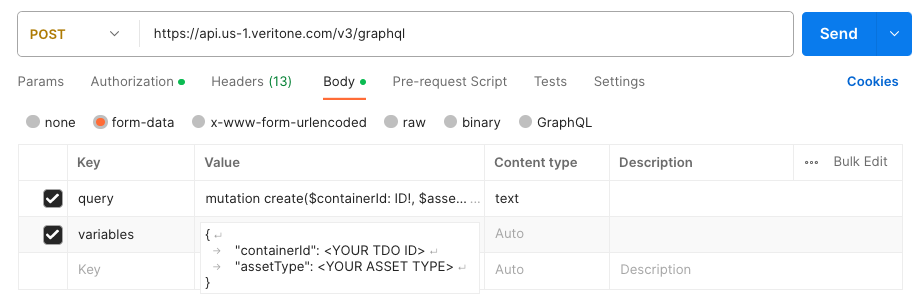
Here's another example using Postman. Here's the mutation:
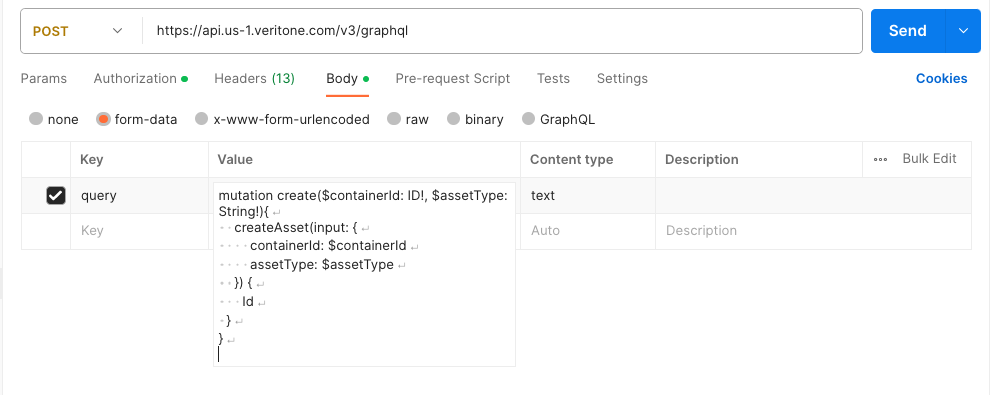
Now bind variables:
And last, attach the file:

Use of a client library that handles multipart form post is strongly recommended.
Below is a bare-bones example using Javascript under NodeJS.
global.fetch = require('node-fetch');;
const request = require('superagent');
let size = data.length;
let tdoId = "<ID of a target temporal data object>";
let query = `mutation {
  createAsset(input: {
     containerId: "${tdoId}"
     contentType: "video/mp4"
     assetType: "media"
   }) {
     id
     uri
   }
}
 `;

let headers = {
  Authorization: 'Bearer ' + <your token>
};
request
  .post('https://api.veritone.com/v3/graphql')
  .set(headers)
  .field('query', query)
  .field('filename', fileName)
  .attach('file', Buffer.from(data, 'utf8'), fileName)
  .end(function gotResponse(err, response) {
    if (!err) {
      let responseData = JSON.parse(response.text);
      console.log("new asset created with id "+ responseData.data.createAsset.id);
    }
  });
Here's another example using Python's requests library. It uses createAsset as an example. However, the request format is exactly the same for all mutations that accept file upload (e.g., updateLibraryEngineModel, uploadEngineResult, etc.). The only difference is in the GraphQL query string.
import requests
import json
import os

# basic function that creates an asset using the Veritone GraphQL API using
# multipart form POST
#   tdoId:  ID of the TDO that will contain the new asset
#   filePath:  local path to the file to upload
#   assetType:  asset type, such as "media" or "transcript"
#   token:  a valid Veritone authentication token
def createAsset(tdoId, filePath, assetType, token):
    # This is the GraphQL query string, using GraphQL variables.
    query = '''
    mutation createAsset($assetType: String!, $containerId: ID!){
        createAsset(input: {
            assetType: $assetType
            containerId: $containerId
        }) {
            id
            assetType
            contentType
            uri
        }
    }
    '''
    # Our variable map will contain the parameter values.
    variables = {
        'assetType': assetType,
        'containerId': tdoId
    }
    # Set up the files for requests library multipart form upload.
    # First determine the base file name from the path
    fileName = os.path.basename(filePath)
    # Now set up the dict containing the file itself
    files = {
        'file': (fileName, open(filePath))
    }
    # Set up authorization header
    headers = {
        'Authorization': 'Bearer %s' % token
    }
    # Finally set up the other form fields.
    data = {
        'query': query,
        # Note that variables should have a string containing JSON.
        'variables': json.dumps(variables)
    }

    # Make the request and print the result
    r = requests.post('https://api.veritone.com/v3/graphql', files=files, data=data, headers=headers)
    print(r.text)



