The aiWARE SDK includes an app bar with a Help icon  and a drop-down menu that you can customize for your application.
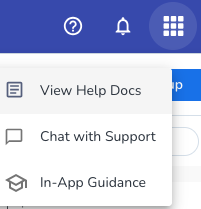
-
View Help Docs - Link to your documentation.
-
Chat with Support - Enable customer service teams to communicate in real-time with cloud-based applications using a chat bot. When enabled, users can select Chat with Support to open a chat box, input their information, and start a conversation.
-
In-App Guidance - Link to your support knowledge base.
To enable and configure the Help menu options in an aiWARE application:
-
Install and initialize the aiWARE SDK, and specify your knowledge base and documentation URLs.
- Create a listener for the event that is triggered when the user clicks a Help menu option in the app bar.
-
Create a Content Security Policy for your app and specify the appropriate domains in the CSP allowlist.
Step 1: Install and initialize the aiWARE SDK and set URLs
Make sure you have installed and initialized the aiWARE SDK using the instructions in Set up the aiWARE SDK.
Set the docsURL and knowledgebaseUrl properties, which specify the View Help Docs and In-App Guidance links. For example:
window.aiware.init(
    {
        baseUrl: '<your-base-url>',
        applicationId: '<your-application-id>',
        knowledgeBaseUrl: 'https://support.veritone.com/s/topic/0TO4U000000bwFQWAY/',
        docsURL: 'https://docs.veritone.com'
    },
    () => {
    // code run by callback function
    }
)
Step 2: Create a listener for the Help menu events
You must create a listener for the event that is triggered when the user clicks a Help menu option.
Add code to the aiware.init callback function, after the call to mount the app bar with aiware.mountWidget. This creates an event handler for the openSupport event, which calls your chat function. You can name your chat bot anything you want.
[Note]The Help panel is automatically mounted.
For example:
// Mount app
window.addEventListener('load', () => {
  window.aiware.init(
    {
      applicationId: '<your-application-id>'
      baseUrl: '<your-base-url>',
      withAuth: false,
      knowledgeBaseUrl:
        'https://support.veritone.com',
      docsURL:
        'https://docs.veritone.com'
    },
    () => {
      window.aiware.mountWidget({
        name: 'APP_BAR',
        config: {
          title: 'Library',
          backgroundColor: '#E65100',
          help: true,
          zIndex: 2
        },
        elementId: 'aiwareAppbar'
      });
      window.aiware.on('openSupport', <yourChatFunction> () => {
            // import/initialize your chat function, and trigger your chat
      });
window.aiware.helpcenter.openDocsPanel>(<custom documentation link>);
window.aiware.helpCenter.openKnowledgeBasePanel(<custom knowledgebase link>)
// Warning: Custom URLs must be added to CSP
    }
  );
Refer to Help panels for additional details.
Step 3: Create a Content Security Policy (CSP) for your app
Add the applicable domains to your application's Content Security Policy allowlist. This allows your application to connect to your chat bot, and your chat bot to connect back to aiWARE.



