Integrated applications in aiWARE use the OAuth 2.0 protocol to authenticate, provide single sign-on, and generate tokens for use with APIs. OAuth delegates user authentication to Veritone and then authorizes the application to obtain user account data while keeping usernames, passwords, and other information private.
Access OAuth keys for applications
To use OAuth with an application you're onboarding into the aiWARE OS, you'll set the process in step 4, Authentication, of the onboarding wizard for applications. See Add an application for more information.
In this step of onboarding an application, you will:
- Choose OAuth as the authentication method
- Supply a callback URL
Choosing OAuth vs None in the Authentication step
In the application onboarding process, choose OAuth when you need your application to authenticate more dynamically, provide single sign-on, and generate tokens for use with APIs. OAuth is mostly used by apps that are building a service outside of aiWARE with multiple users, where an SSO token isn't flexible enough.

Callback URLs
You'll create the callback URL in your external service or app. Veritone sends messages back from the callback URL in the OAuth handshake.
Client IDs and client secrets
When an application is submitted, a set of authorization credentials — a client ID and a client secret — is issued that identifies the app to aiWARE's OAuth 2.0 server.
- Application client ID: A publicly exposed string that is used by the Veritone API to identify the application. The Application client ID is also built into the Authorization URL that authenticates users.
- Client secret: A unique value that can be used to authenticate the identity of the application to the aiWARE API when the application requests to access a user's account.
- Redirect URI: The URI where the user is directed after the user authorizes the application to access the account. The redirect URI points to the part of the application that handles authorization codes or access tokens.
Access the client ID, client secret, and redirect URI
The client ID, client secret, and redirect URI are available on the Application details page.
- Log into Veritone Developer. Click Applications in the left sidebar.
- Select your application. Double-click to open. An overview page opens.
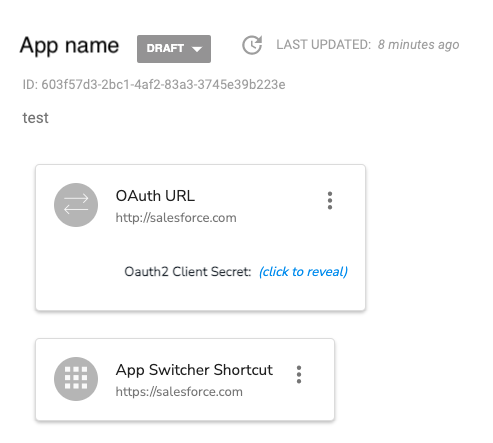
- To retrieve the client secret, click the click to reveal link. Enter your Veritone password when prompted, and click Submit (don't press enter on your keyboard). The client secret displays.
Examples and libraries
The passport-veritone library provides a strategy for Passport JS for use in NodeJS apps to handle the OAuth2 token exchange.
[Note] veritone-widgets-server implements the full token exchange using passport-veritone. veritone-oauth-helpers implements the client-side portion of the OAuth2 flow, with simple login() and logout() functions.
Flow options
Veritone supports two OAuth choreographies:
- A single-factor flow, sometimes called the Implicit Grant flow, involves a single round trip to the auth server. This flow type can be used by simple static web apps that aren't able to rely on server-side logic.
- A two-factor flow, also known as a PKCE (Proof Key for Code Exchange) flow, involves a trip to the auth server from the client, and a separate trip (using a second authentication factor, the "client secret"), via a back-end server that hosts your app.
These are covered below.
Implementing the single-factor flow
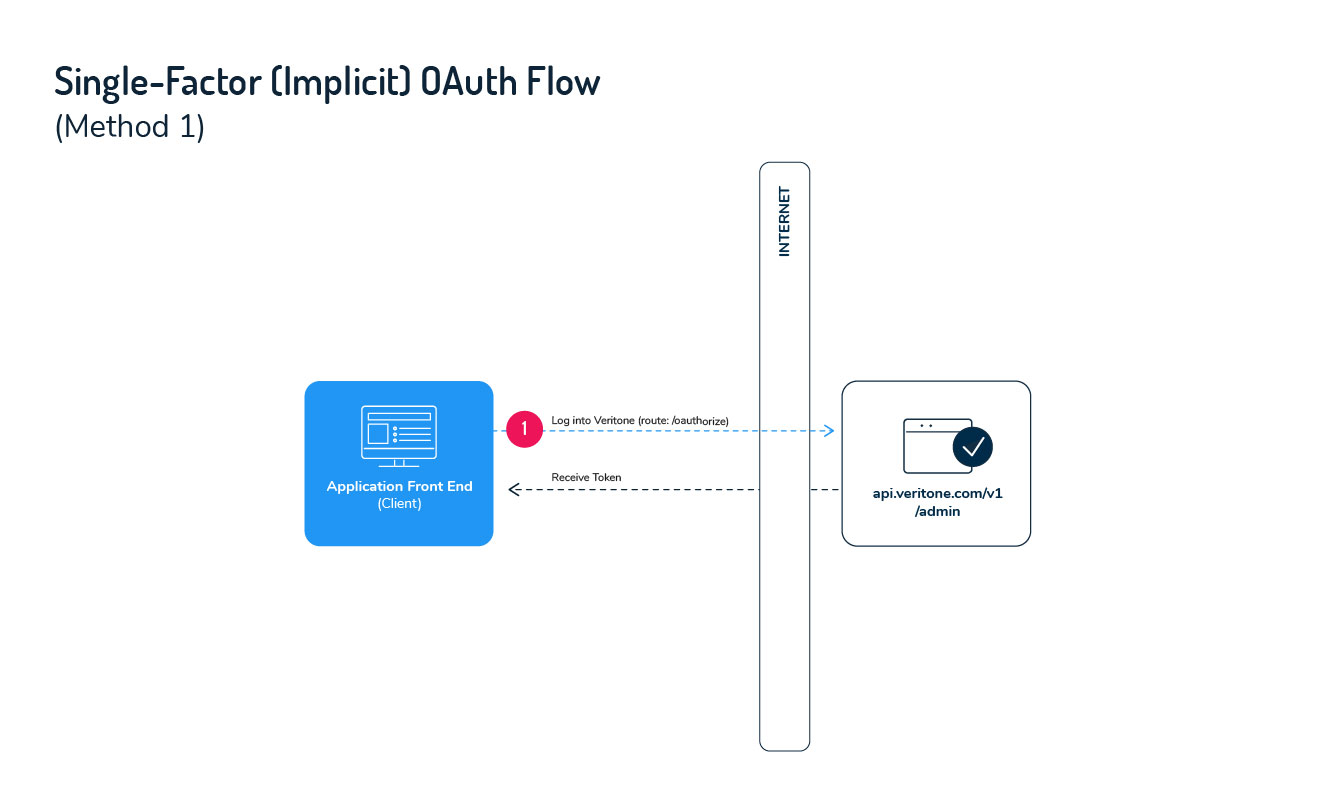
The single-factor (Implicit Grant) flow for OAuth is intended for simple browser-based ("serverless") web applications where the confidentiality of the client secret cannot be maintained. This is a redirection-based flow with all communication happening on the front end. The token to access a user's account is given to the browser to forward to the application. At a high-level, the single-factor flow follows these steps when a user clicks Sign In with Veritone in the app's UI.
- The application redirects the user to the Veritone authorization page, where the user authenticates by logging in.
- At user login, Veritone redirects the user back to the application's redirect URI with an access token as a URL fragment after the hash.
- The application extracts the access token from the URL and uses it as the API key.
[Note]
- The client secret isn't used with the single-factor flow because it isn't confidential.
- The single-factor (Implicit Grant) flow doesn't support refresh tokens. As a result, the app must request a new token each time the user logs in (if the token is not stored), or when the access token expires.
Step 1: Authenticate user and get access token
When a user begins a session with the app, they click "Sign In With Veritone" on the login page and initiate the authentication process. In this first step, you'll construct a link that sends the user to Veritone's authorization page and requests an access token from the API. Use the components below to build the authorization URL.
To locate the client ID and redirect URI, click the name of your app on the Applications dashboard.
Authorization link components
| Parameter | Type | Description |
|---|
| response_type | string | The type of response being requested. Set the value as token to indicate that your application is requesting an access token in the response. |
| client_id | string | The unique ID of your application. You can get the ID on the Application settings page. |
| redirect_uri | string | The URL that you want the user redirected to after granting access to your app. This must match the redirect URI value in the Application Settings. |
| scope | string | he level of access that your application is requesting. Currently, the only permissible value for the scope parameter is all. |
Sample authorization URL
https://api.veritone.com/v1/admin/oauth/authorize?response_type=token&client_id=e6ac4220-5898-456b-b6ae-ff4f4bb6b9bf&redirect_uri=https://bestappever.com/oauth/callback&scope=all
User authorizes application
When the user follows the authorization URL, they'll be prompted to log in to Veritone to authenticate their identity and authorize your application to use the account.
Application receives access token
After granting access by logging in, the user is sent to your application's redirect URI with an Access Token appended to the URL.
Sample redirect URI with access token
https://bestappever.com/oauth/callback#access_token=eyJhbGciOiJIUzI1NiIsInR5cCI6IkpXVCJ9.eyJ1c2VySWQiOiI4YTEwZjIxYS1mYzY5LTQ4NTctODkwZS1iMDNmZGU1ZGJlYjMiLCJjb250ZW50QXBwbGljYXRpb25JZCI6ImVkMDc1OTg1LWJjOTQtNDA2Yi04NjM5LTQ0ZDFkYTQyYzNmYiIsIm9yaWdpbkhvc3QiOiJjYXBhcHAuY29tIiwic2NvcGUiOlt7ImFjdGlvbnMiOlsiaW5nZXN0aW9uOmRlbGV0ZSIsImluZ2VzdGlvbjp1cGRhdGUiLCJpbmdlc3Rpb246cmVhZCIsImluZ2VzdGlvbjpjcmVhdGUiLCJqb2I6Y3JlYXRlIiwiam9iOnJlYWQiLCJqb2I6dXBkYXRlIiwiam9iOmRlbGV0ZSIsInRhc2s6dXBkYXRlIiwicmVjb3JkaW5nOmNyZWF0ZSIsInJlY29yZGluZzpyZWFkIiwicmVjb3JkaW5nOnVwZGF0ZSIsInJlY29yZGluZzpkZWxldGUiLCJyZWNvcmRpbmc6Y2xvbmUiLCJyZXBvcnQ6Y3JlYXRlIiwiYW5hbHl0aWNzOnVzYWdlIiwibWVudGlvbjpjcmVhdGUiLCJtZW50aW9uOnJlYWQiLCJtZW50aW9uOnVwZGF0ZSIsIm1lbnRpb246ZGVsZXRlIiwiY29sbGVjdGlvbjpjcmVhdGUiLCJjb2xsZWN0aW9uOnJlYWQiLCJjb2xsZWN0aW9uOnVwZGF0ZSIsImNvbGxlY3Rpb246ZGVsZXRlIiwiYXNzZXQ6dXJpIl19XSwiaWF0IjoxNTIxNTUzMTY1LCJleHAiOjE1MjIxNTc5NjUsInN1YiI6Im9hdXRoMiIsImp0aSI6IjQ1OTk3NTBmLWY0ZjYtNGQ4OC05MDAwLTU5M2U1NzI5MmQ5NSJ9.1IduQXLnATUqnJnDKLJ2-uM2iimaT6qEkGetl6qm2Bk&token_type=Bearer
Errors
If authorization fails, an error response is sent to your application's redirect URI in the format shown below.
http://yourapp.com#error={error_ID}
Errors are appended to the URI using one of the following Error IDs:
| Error ID | Details |
|---|
| invalid_request | The request is missing a necessary parameter or the parameter has an invalid value. |
| unauthorized_client | The client ID is invalid or the client is not authorized to request an authorization code using this method. |
| access_denied | The server denied the request. |
| unsupported_response_type | The specified response type is invalid or unsupported. |
| invalid_scope | The requested scope is invalid, unknown, or malformed. |
| server_error | The server encountered an internal error. |
| temporarily_unavailable | The server is temporarily unavailable but should be able to process the request at a later time |
Step 2: Use the access token
After your application has an access token, you can use it to access the user's account via the Veritone API. To make requests, pass the access token in the Authorization header with the value Bearer {access token} as shown.
Sample header format
Authorization: Bearer eyJhbGciOiJIUzI1NiIsInR5cCI6IkpXVCJ9.eyJ1c2VySWQiOiI4YTEwZjIxYS1mYzY5LTQ4NTctODkwZS1iMDNmZGU1ZGJlYjMiLCJjb250ZW50QXBwbGljYXRpb25JZCI6ImVkMDc1OTg1LWJjOTQtNDA2Yi04NjM5LTQ0ZDFkYTQyYzNmYiIsIm9yaWdpbkhvc3QiOiJjYXBhcHAuY29tIiwic2NvcGUiOlt7ImFjdGlvbnMiOlsiaW5nZXN0aW9uOmRlbGV0ZSIsImluZ2VzdGlvbjp1cGRhdGUiLCJpbmdlc3Rpb246cmVhZCIsImluZ2VzdGlvbjpjcmVhdGUiLCJqb2I6Y3JlYXRlIiwiam9iOnJlYWQiLCJqb2I6dXBkYXRlIiwiam9iOmRlbGV0ZSIsInRhc2s6dXBkYXRlIiwicmVjb3JkaW5nOmNyZWF0ZSIsInJlY29yZGluZzpyZWFkIiwicmVjb3JkaW5nOnVwZGF0ZSIsInJlY29yZGluZzpkZWxldGUiLCJyZWNvcmRpbmc6Y2xvbmUiLCJyZXBvcnQ6Y3JlYXRlIiwiYW5hbHl0aWNzOnVzYWdlIiwibWVudGlvbjpjcmVhdGUiLCJtZW50aW9uOnJlYWQiLCJtZW50aW9uOnVwZGF0ZSIsIm1lbnRpb246ZGVsZXRlIiwiY29sbGVjdGlvbjpjcmVhdGUiLCJjb2xsZWN0aW9uOnJlYWQiLCJjb2xsZWN0aW9uOnVwZGF0ZSIsImNvbGxlY3Rpb246ZGVsZXRlIiwiYXNzZXQ6dXJpIl19XSwiaWF0IjoxNTIxNTUzMTY1LCJleHAiOjE1MjIxNTc5NjUsInN1YiI6Im9hdXRoMiIsImp0aSI6IjQ1OTk3NTBmLWY0ZjYtNGQ4OC05MDAwLTU5M2U1NzI5MmQ5NSJ9.1IduQXLnATUqnJnDKLJ2-uM2iimaT6qEkGetl6qm2Bk
Access tokens expire after seven days. Unlike the two-factor (PKCE) flow, refresh tokens aren't available via the single-factor flow. Refreshing a token requires the client secret, which can't safely be stored in the single-factor flow scenario.
[Note]
- If your application doesn't store the Access Token, users are required to log in and re-authorize your app with each session.
- If your application stores the token and sends the user to the authorization page before the access token expires, the user won't be prompted to log in and is immediately redirected to your application.
- API calls made with an expired or invalid token result in an error.
Implementing the two-factor (PKCE) flow
The two-factor PKCE flow is designed for server-side applications where the confidentiality of the client secret can be maintained.
[Note] The two-factor PKCE flow can be used in serverless apps. For example, taking advantage of Lambda environment variables using serverless-dotenv-plugin.
The two-factor PKCE flow is a redirection-based flow that begins with user authentication returning an Authorization Code that's then exchanged for an access token. When asking for the access token, your app presents the client secret as an additional security factor. Along with the access token, your app gets a Refresh Token that can be saved in a database and used at a later point to generate a new access token, after the original expires. Because the Authorization Code Flow uses a client ID and a securely stored client secret to retrieve tokens from the back end, it has the benefit of not exposing tokens to the web client.

At a high level, the two-factor PKCE flow follows these steps when a user clicks Sign In with Veritone:
- Your application redirects the user to the Veritone authorization server, where the user authenticates their identity and authorizes your app to access the user's account by logging in.
- An Authorization Code is passed to your application from the Veritone authorization server.
- Your application sends the Authorization Code, plus the client secret (which you should have obtained earlier via the Veritone Developer app, as noted earlier in this topic), to Veritone. In return, Veritone sends back an Access Token and a Refresh Token.
- Your application uses the Access Token to call the Veritone API.
Step 1: Authenticate user and get authorization code
User authentication begins when the user clicks Sign In With Veritone. When the button is clicked, you'll send the user to an authorization page where they authenticate. For this first step, you'll construct a link to the authorization server by adding specific parameters to the query that identify your app (see below).
To find the client ID and redirect URI to include in the authorization URL in the settings for your app, click the name of your app on the Applications dashboard of Veritone Developer. (See discussion at the top of this page.)
Authorization URL components
| Parameter | Type | Description |
|---|
| response_type | string | The type of response being requested. Set the value as code to indicate that your application is requesting an authorization code in the response. |
| client_id | string | The unique ID of your application. You can get the ID from the Application Settings page. |
| redirect_uri | string | The URL that you want the user redirected to after granting access to your app. This must match the redirect URI value in the Application Settings. |
| scope | string | The level of access that your application is requesting. Currently the only permissible value for the scope parameter is all. |
| state | string | This can be any string, of any length. The state value you send here will be sent back to you in the server response; you should verify that this value has not changed. (The state parameter should be a unique one-time value, to prevent replay attacks.) The intended use of this parameter is described in more detail here. |
Sample authorization URL
https://api.veritone.com/v1/admin/oauth/authorize?response_type=code&client_id=e6ac4220-5898-456b-b6ae-ff4f4bb6b9bf&redirect_uri=https://bestappever.com/oauth/callback&scope=all
User authorizes application
When the user clicks the link, they're prompted to log into Veritone to authenticate their identity and authorize your application to access their account.
Application receives authorization code
After the user grants access by logging in, the user arrives at the application's redirect URI with an Authorization Code query parameter appended to the URL. Use that code in the next step to get an Access Token and a Refresh Token from Veritone.
Sample redirect URI with authorization code
https://bestappever.com/oauth/callback?code=U1XbJMBhiRk
Possible errors
| Error ID | Details |
|---|
| invalid_request | The request is missing a necessary parameter or the parameter has an invalid value. |
| unauthorized_client | The client ID is invalid or the client is not authorized to request an authorization code using this method. |
| access_denied | The server denied the request. |
| unsupported_response_type | The specified response type is invalid or unsupported. |
| invalid_scope | The requested scope is invalid, unknown, or malformed. |
| server_error | The server encountered an internal error. |
| temporarily_unavailable | The server is temporarily unavailable but should be able to process the request at a later time |
Step 2: Request access and refresh tokens
Your application uses the Authorization Code it received, along with a client secret (which you should have obtained in the Veritone Developer UI) to request an Access Token and a Refresh Token from the Veritone server. To exchange the auth code and client secret for tokens, make an HTTP POST request to the Token Exchange endpoint with the parameters below posted as a part of the URL-encoded form values.
[Warn] To ensure the security of the client secret, this request must happen from your application server and not the front end of your app.
Request details
Request parameters
| Parameter | Type | Description |
|---|
| client_id | string | The unique ID of your application. You can get the ID from the Application Settings page. |
| client_secret | string | Your application's client secret. You can get the client secret from the Application Settings page. |
| grant_type | string | The grant type of the request. The value must be authorization_code to indicate that your application is exchanging an Authorization Code for a Access and Refresh Tokens. |
| state | string | This can be any string, of any length. The state value you send here will be sent back to you in the server response; you should verify that this value has not changed. (The state parameter should be a unique one-time value, to prevent replay attacks.) The intended use of this parameter is described in more detail here. |
| code | string | The Authorization Code value returned to your redirect URI when the user authorized your app. |
| redirect_uri | string | The redirect URI that was used when the user authorized your app (Step 1). This must match the redirect URI value in the Application Settings. |
Sample request
curl -X POST \
https://api.veritone.com/v1/admin/oauth/token \
-H 'content-type: application/x-www-form-urlencoded' \
-d 'client_id=e6ac4220-5898-456b-b6ae-ff4f4bb6b9bf&client_secret=3GJjP97ryVwKvqXt6L518Hf5wUEZ1Po2lsobEEoAZh1D-WxB35cn-A&code=U1XbJMBhiRk&grant_type=authorization_code&redirect_uri=https://bestappever.com/oauth/callback'
Application receives access token
A successful response from the code exchange request contains the access_token and refresh_token.
Sample response
{
   "access_token": "eyJhbGciOiJIUzI1NiIsInR5cCI6IkpXVCJ9.eyJ1c2VySWQiOiI4YTEwZjIxYS1mYzY5LTQ4NTctODkwZS1iMDNmZGU1ZGJlYjMiLCJjb250ZW50QXBwbGljYXRpb25JZCI6ImVkMDc1OTg1LWJjOTQtNDA2Yi04NjM5LTQ0ZDFkYTQyYzNmYiIsIm9yaWdpbkhvc3QiOiJjYXBhcHAuY29tIiwic2NvcGUiOlt7ImFjdGlvbnMiOlsiaW5nZXN0aW9uOmRlbGV0ZSIsImluZ2VzdGlvbjp1cGRhdGUiLCJpbmdlc3Rpb246cmVhZCIsImluZ2VzdGlvbjpjcmVhdGUiLCJqb2I6Y3JlYXRlIiwiam9iOnJlYWQiLCJqb2I6dXBkYXRlIiwiam9iOmRlbGV0ZSIsInRhc2s6dXBkYXRlIiwicmVjb3JkaW5nOmNyZWF0ZSIsInJlY29yZGluZzpyZWFkIiwicmVjb3JkaW5nOnVwZGF0ZSIsInJlY29yZGluZzpkZWxldGUiLCJyZWNvcmRpbmc6Y2xvbmUiLCJyZXBvcnQ6Y3JlYXRlIiwiYW5hbHl0aWNzOnVzYWdlIiwibWVudGlvbjpjcmVhdGUiLCJtZW50aW9uOnJlYWQiLCJtZW50aW9uOnVwZGF0ZSIsIm1lbnRpb246ZGVsZXRlIiwiY29sbGVjdGlvbjpjcmVhdGUiLCJjb2xsZWN0aW9uOnJlYWQiLCJjb2xsZWN0aW9uOnVwZGF0ZSIsImNvbGxlY3Rpb246ZGVsZXRlIiwiYXNzZXQ6dXJpIl19XSwiaWF0IjoxNTIxNTUzMDA3LCJleHAiOjE1MjIxNTc4MDcsInN1YiI6Im9hdXRoMiIsImp0aSI6ImU5M2I1ODI4LTI2ZWEtNDRjZC1iY2RjLTJhODI0NzdjYWUwNCJ9.c8YmVN_R4OhVYFRscBi1wIXIX7MzhPwixHe-UQ05gE0",
   "refresh_token": "xi_kwP2_laa4t7_Mwu-k0a_dka3V3YWfIH-Nm7C84XaBvkjyUDdS5A",
   "token_type": "Bearer"
}
The application is now authorized. The access_token can be used to authenticate API requests that the app makes.
Possible errors
| Error ID | Details |
|---|
| invalid_client | Application authentication failed. |
| invalid_grant | The code is invalid or the redirect_uri does not match the one used in the authorization request. |
| invalid_request | A required parameter is missing or invalid. |
| unauthorized_client | The application is not authorized to use the grant. |
| unsupported_grant_type | The grant_type isn't authorization_code. |
Step 3: Using OAuth 2.0 access tokens
Your application uses the access token to access the user's account via the Veritone API. An access token is passed as a bearer token in the Authorization HTTP header of requests.
Sample header format
Authorization: Bearer {access token}
[Note] Access tokens expire after seven days. The refresh token may be used to request new a new access token after the initial token expires. If the access token is expired or otherwise invalid, the API will return an error.
Step 4: Using a refresh token
Access tokens expire every seven days. When an access token expires, using it to make an API request will result in an "Invalid Token Error." Use the Refresh Token that was included when the original access token was issued to get a new access token without requiring the user to be redirected.
Request Details
- HTTP Method: POST
- Content Type: application/x-www-form-urlencoded
- Response Format: JSON
- Endpoint: https://api.veritone.com/v1/admin/oauth/token
Request Parameters
| Parameter | Type | Description |
|---|
| client_id | string | The unique ID of your application. You can get the ID from the Application Settings page. |
| client_secret | string | Your application's client secret. You can get the client secret from the Application Settings page. |
| grant_type | string | The grant type of the request. The value must be `refresh_token` to indicate that your application is exchanging an Authorization Code for Access and Refresh Tokens. |
| refresh_token | string | The Refresh Token value obtained when the original Access Token was issued. |
Sample request
curl -X POST \
https://api.veritone.com/v1/admin/oauth/token \
-H 'content-type: application/x-www-form-urlencoded' \
-d 'client_id=e6ac4220-5898-456b-b6ae-ff4f4bb6b9bf&client_secret=3GJjP97ryVwKvqXt6L518Hf5wUEZ1Po2lsobEEoAZh1D-WxB35cn-A&grant_type=refresh_token&refresh_token=xi_kwP2_laa4t7_Mwu-k0a_dka3V3YWfIH-Nm7C84XaBvkjyUDdS5A'
Sample response
{
  "access_token": "eyJhbGciOiJIUzI1NiIsInR5cCI6IkpXVCJ9.eyJ1c2VySWQiOiI4YTEwZjIxYS1mYzY5LTQ4NTctODkwZS1iMDNmZGU1ZGJlYjMiLCJjb250ZW50QXBwbGljYXRpb25JZCI6IjAwMDAwMDAwLTAwMDAtMDAwMC0wMDAwLTAwMDAwMDAwMDAwMCIsIm9yaWdpbkhvc3QiOiJjYXBhcHAuY29tIiwic2NvcGUiOlt7ImFjdGlvbnMiOlsiaW5nZXN0aW9uOmRlbGV0ZSIsImluZ2VzdGlvbjp1cGRhdGUiLCJpbmdlc3Rpb246cmVhZCIsImluZ2VzdGlvbjpjcmVhdGUiLCJqb2I6Y3JlYXRlIiwiam9iOnJlYWQiLCJqb2I6dXBkYXRlIiwiam9iOmRlbGV0ZSIsInRhc2s6dXBkYXRlIiwicmVjb3JkaW5nOmNyZWF0ZSIsInJlY29yZGluZzpyZWFkIiwicmVjb3JkaW5nOnVwZGF0ZSIsInJlY29yZGluZzpkZWxldGUiLCJyZWNvcmRpbmc6Y2xvbmUiLCJyZXBvcnQ6Y3JlYXRlIiwiYW5hbHl0aWNzOnVzYWdlIiwibWVudGlvbjpjcmVhdGUiLCJtZW50aW9uOnJlYWQiLCJtZW50aW9uOnVwZGF0ZSIsIm1lbnRpb246ZGVsZXRlIiwiY29sbGVjdGlvbjpjcmVhdGUiLCJjb2xsZWN0aW9uOnJlYWQiLCJjb2xsZWN0aW9uOnVwZGF0ZSIsImNvbGxlY3Rpb246ZGVsZXRlIiwiYXNzZXQ6dXJpIl19XSwiaWF0IjoxNTIxNzQwNTQyLCJleHAiOjE1MjIzNDUzNDIsInN1YiI6Im9hdXRoMiIsImp0aSI6IjE2ZTg5ZWE1LTUwMTUtNGQzOS05OTJlLTIyZGQ0ZWVhNTdhYiJ9.9zMKZsbKIiAkmxhYsV4QJ1RiSKm4H1jp51w5iRqTQ-8",
  "refresh_token": "xi_kwP2_laa4t7_Mwu-k0a_dka3V3YWfIH-Nm7C84XaBvkjyUDdS5A",
  "token_type": "Bearer"
}



