You can customize an engine's input to specify custom configuration parameters. Customizing engine input can help you do something like:
- Specify the desired input or output language (e.g. 'en-US') using ISO 639-1 standard language codes
- Specify a particular time zone
- Set minimum confidence thresholds
- Specify the URL of a webhook
- Point to a schema
Adding a custom field to an engine project results in each field name specified becoming a property name (key) in the request body that the engine receives at runtime. Each field label specified becomes a form-field label in the UI.
Before you begin
Check for the existence of a field before using its value. If the field exists, check for an empty string or null value. Custom fields do not automatically show up in the body if the relevant form fields are left empty (no value supplied) in the UI.
If you have written the engine in Golang
Check the engine using a map[string]interface{}
value:=payload["fieldname"]
If you have written the engine in Python
Load the payload into a dictionary.
from flask import Flask, jsonify, request
@app.route('/process', methods=['POST'])
def process():
    ...
    payload = json.loads(request.form['payload']
You can use the payload directly, or assign the values to local variables. When the key is optional put the default value in the second argument of the dictionary get method.
start_offset = payload.get("startOffset", 0)
Steps
Add a custom field using Veritone Developer
- In Veritone Developer, during the engine registration process, select Add custom field.
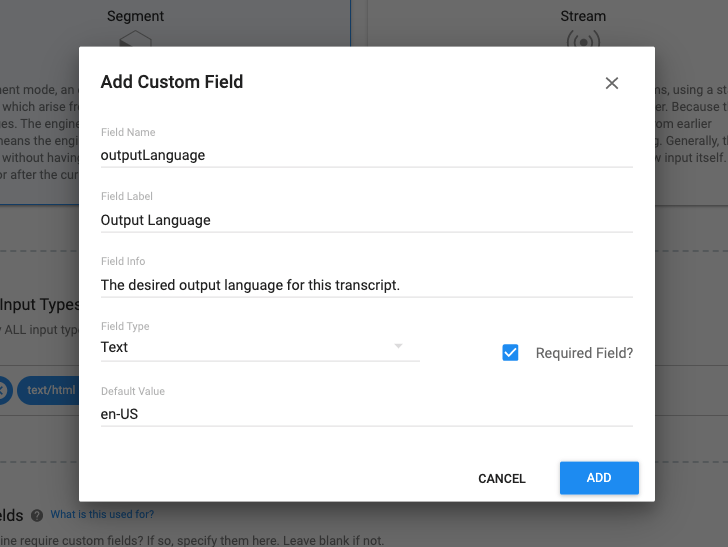
At runtime, the value of Field Name is passed as a form-field parameter in the body and is posted to the engine's /process handler. This example creates a field named outputLanguage.
Add a custom field using GraphQL
In GraphQL, paste this code, replacing engineId with the ID of your engine and payload with a JSON object containing the data you want to pass as an input.
    mutation runMyEngineJob {
      createJob(
        input: {
          targetId: "531117144"
          isReprocessJob: true
          tasks: [
            {
              engineId: "386e022f-edd1-46ec-b1cc-84d203a37250" // Your engine ID.
              payload: { cutoff: 0.5 } // Your payload to pass as an input.
            }
          ]
        }
      ) {
        id
      }
    }
The response looks like this, where the custom input, cutOff, is the second field listed.
    {
        "applicationId": "a22cb5c0-dc00-4c3f-adef-18e28e5b561d",
        "cutoff": 0.5,
        "jobId": "19104428_GvNQ57jXtG",
        "organizationId": "17532",
        "recordingId": "531117144",
        "taskId": "19104428_GvNQ57jXtGlRXJv",
            "cutoff": 0.5,
            "organizationId": 17532
        },
        "token": "eyJhbGciOiJIUzI1NiIsInR5cCI6IkpXVCJ9",
        "veritoneApiBaseUrl": "https://api.veritone.com"
    }
You can enter different input parameters (different keys, as well as values) on different invocations of the same engine. The custom-input JSONData blob can differ per task.



