Depending on the type of your engine, certain parameters may be required for users to input in order to process the task. For example, a detection-based engine may need a minimum confidence level for a result to be considered valid.
The custom fields feature allows you to define these parameters, which are then configurable by engine users. These configured parameters will be available to your engine inside of the payload it receives at runtime.
Set custom fields in Veritone Developer
Set custom fields in Veritone Developer when registering an engine during step 2, Functionality.

Click + Custom Field. The Add Custom Fields panel slides out.
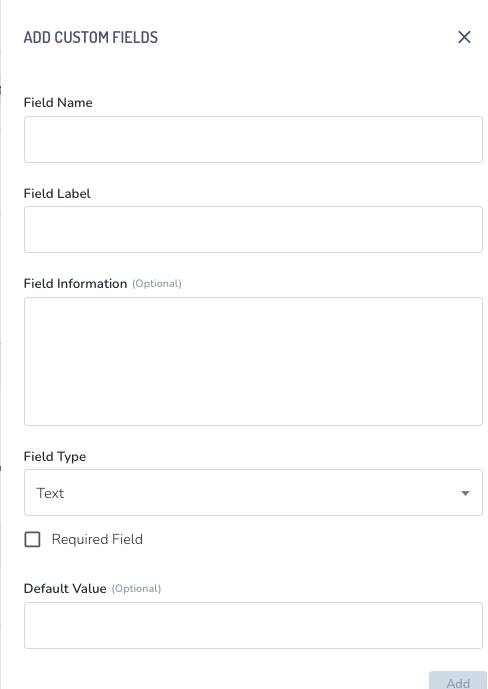
You can set:
- Field Name Field name will be used as the
key of the parameter inside of the taskPayload given to your engine at runtime. - Field Label Field label is used as the name of your parameter as displayed to end users.
- Field Info Field info is used to provide a description to end users regarding the purpose of the parameter.
- Field Type Field type represents the type of input your parameter requires. See the table below for details.
| Type | Description |
|---|
| Text | Standard text input |
| Number | Standard number input with optional min/max/step restrictions |
| Picklist | Define a list of KVP options, where only a single value is selectable |
| MultiPicklist | Define a list of KVP options, where multiple values are selectable |
| SchemaSelection | For engines that accept a data schema as an input |
- Default Value Default value will be used as the initial value of your parameter when being displayed to end users.
Querying an engine's fields using GraphQL
You can use the query below to view an engine's fields. Replace the id replaceMe below with the id of the engine you want to query.
query {
  engine(id: "replaceMe") {
    fields {
      name
      label
      info
      type
      min
      max
      step
      options {
        key
        value
      }
      defaultValue
      defaultValues
    }
  }
}



