If you're following the steps to build a simple text-processing engine, this is step 5. To see all the steps, see the user guide process page.
Engines are deployed to the Veritone platform in Docker containers, which are like lightweight virtual machines. The platform automatically creates instances of your engine to meet demand.
All engines in aiWARE are packaged as executable Docker containers, which are exposed via webhook through Veritone's Engine Developer Toolkit. An engine webhook can pass data as a JSON object, which makes engines widely compatible with all the programming languages. The most common languages used for implementing engines are Go, Node.js, and Python.
You can deploy an engine by adding the Docker image or a file of the Docker image to aiWARE.
[Note] The terms onboard and deploy are both used here, and refer to the action of adding engines to the Veritone platform.
The instructions below assume you have already written an engine.
Onboard with a Docker image
To onboard a Docker image engine in Veritone Developer, you need the following:
- A Docker image engine in your computer or VM.
- Access to a Docker image repository. This documentation uses Docker Hub.
Steps
- In the terminal, log in to the Docker image repository. Type this command:
docker login
- To tag and push the Docker image, type the following:
docker tag engineName DockerHubUsername/engineName
docker push DockerHubUsername/engineName
where
engineName is the engine build in your local computer or VM.DockerHubUsername is a repository in the default registry in Docker Hub.
- Now deploy in Veritone Developer.
Onboard with a file
To onboard an engine with a file, you need the following:
- A Docker image engine in your computer or VM.
- Access to a storage repository that can be accessed by aiWARE. This documentation uses Amazon S3.
Steps
- In the terminal, in a temporary directory, type the following:
docker save engineName | gzip > engineName.tar.gz
- In your browser, go to your account in Amazon S3.
- Upload the engine file.
- When the upload is complete, click Close. The Bucket page appears.
- In the Objects tab, in the Files and Folders section, click the engine file checkbox, and then click Actions > Make public.
- Select the engine file. The properties page appears.
- In the Objects overview section, copy the Object URL. Now you're ready to deploy in Veritone Developer.
Deploy in Veritone Developer
- In Veritone Developer, in the left menu, click Engines. The Engines overview page appears.
- Select the engine to deploy from the list or use the filter
 to search by name.
 - From the engine builds panel, click the Builds tab. The engine has an Available status, depending on your engine configuration and your permissions.
- Click Submit. The status changes to Approved.
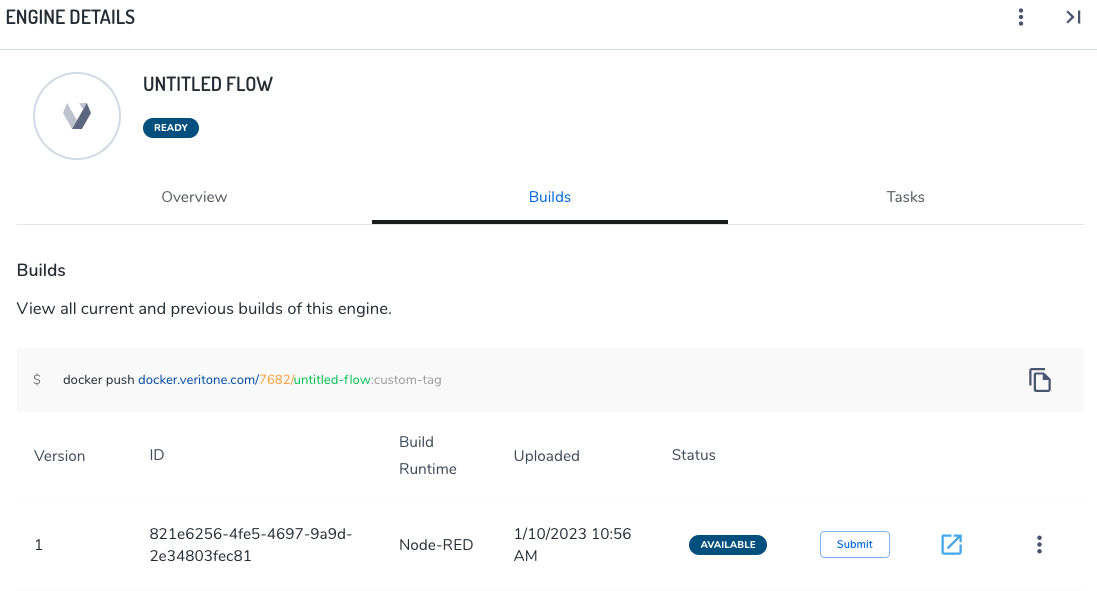
- Click Deploy. The status changes to Deployed.
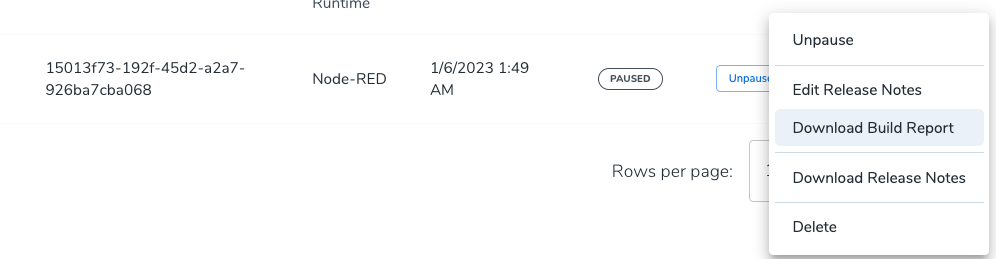
If an abnormal deployment status is showing, use the menu control at the right edge of the list item to expose and select the Download Build Report command. The Build Report is a JSON file that contains clues about what's wrong with the build.
What to do next
Test the engine in aiWARE in step 6: Test the engine in aiWARE.



