Engines are the main unit of cognitive computing in aiWARE. As processing units that accept data, such as audio, video, images and text, engines produce extracted output used to generate accurate predictions and insights and automate many tasks. Hundreds of engines are available on the aiWARE platform. You can use those that fit your purpose, or build your own and deploy it into aiWARE.
We recommend writing or using a custom engine when:
-
You have a custom model (either written from scratch or pre-trained on your data)
-
You want to work with a new version of a foundation model
-
You want to execute custom code as a task in an aiWARE job (In most cases, Automate is the best option, but if you have an existing code/container, or a complex workflow, using it as an engine may be best)
Engine build flow
At a high level, the steps to create and onboard an engine include: 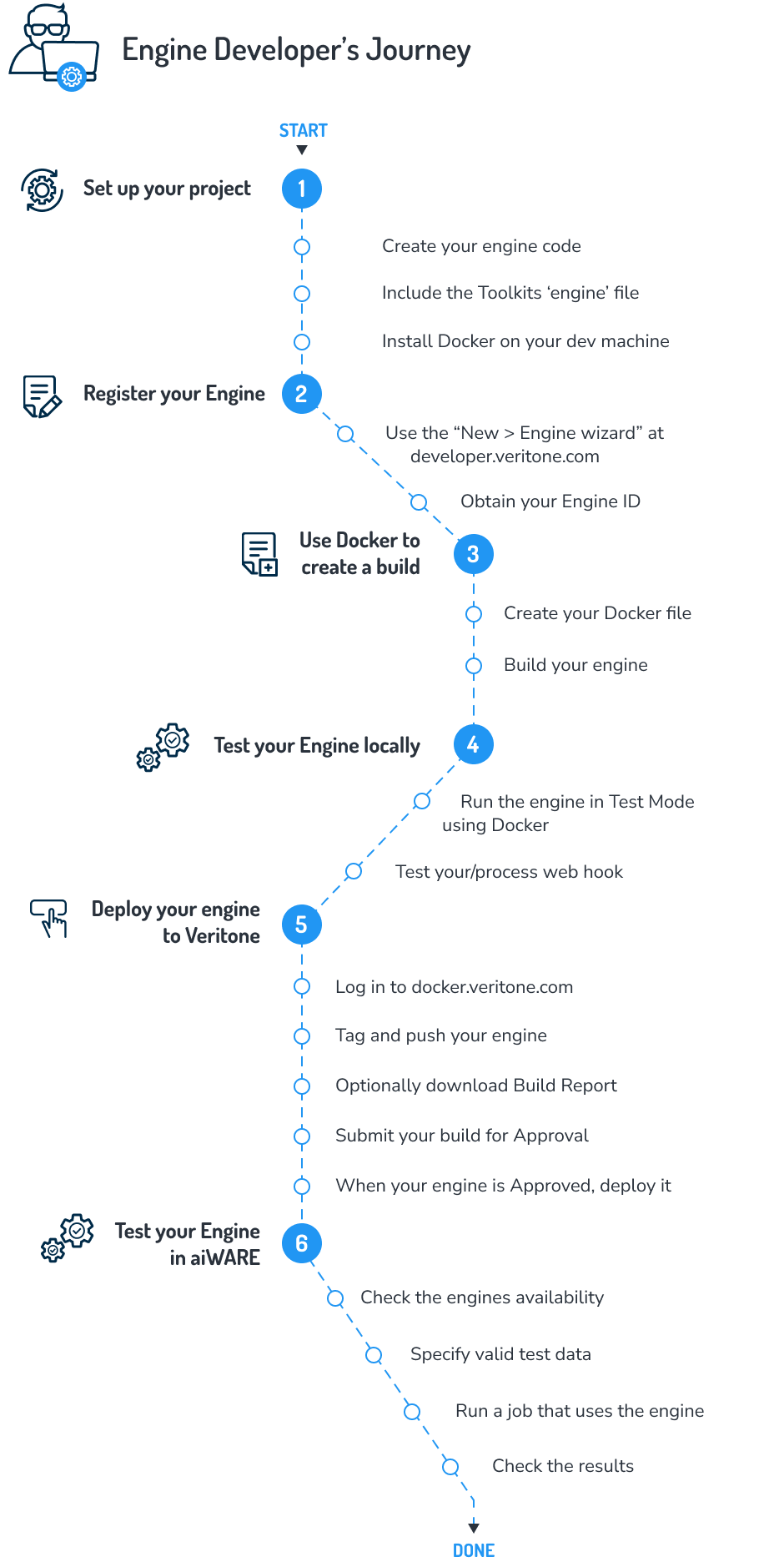
Languages used to write an engine
You can use any programming language to create a cognitive engine as long as the runtimes can be packaged into a Docker image. Node.js and Golang are commonly used.
Regardless of the programming language that you choose, engines are Docker containers that process data and expose webhooks for callbacks. Note that different languages offer different ways of accessing a file upload. In Node.js, a third-party open-source middleware module called Multer is one way of handling form-based file streaming.
Using Golang
It is necessary to ensure a completely statically linked Go binary. Otherwise, the engine will fail to be started by the Veritone Engine Toolkit, and tasks for the engine will be stuck in pending mode. There are two ways to completely statically link the binary:
- Setting the environment variable
CGO_ENABLED=0 before the Go build. For example: CGO_ENABLED=0 go build ...... - Go build with
-ldflags "-linkmode external -extldflags -static -w' For example: go build -ldflags "-linkmode external -extldflags -static -w"
Requirements for writing an engine
- Run the latest version of Docker. On some OS platforms, building Docker containers for engines can result in errors that have been addressed in latest versions of Docker. Containers must be amd64 for consistency.
- Use
--platform linux/amd64 on your Docker build command. This targets the build to be linux/amd64, which is the same infrastructure as aiWARE. If this fails, double check that you have the latest version of Docker. - Make sure any binary (for example, if this is a Golang engine) is also built targeting
linux/amd64. An example for Go: GOOS=linux GOARCH=amd64 go build -o ./dist/engine
Fields available to engines
Every incoming chunk of data arrives as part of a multipart/form-data POST to your engine's /process webhook.
The following fields are posted to your /process webhook:
| Field Name | Description |
|---|
chunkMimeType | (string) The MIME type of the chunk (for example, image/jpg) |
startOffsetMS | (int) The start time of the chunk (for example, the timestamp of when a frame was extracted from a video). This applies only to temporal data |
endOffsetMS | (int) The end time of the chunk (see startOffsetMS) |
width | (int) The width of the chunk. (This applies only to visual media.) |
height | (int) The height of the chunk. (This applies only to visual media.) |
libraryId | (string) ID of the library related to this task. (Applies to engines that require an external library.) |
libraryEngineModelId | (string) ID of the library engine model related to this task. |
cacheURI | (string) URL of the chunk's source file |
veritoneApiBaseUrl | (string) The root URL for Veritone platform API requests. Example: https://api.us-1.veritone.com |
token | (string) The token to use when making low level API requests. (Note: This token is specially scoped and cannot be reused in other contexts.) |
payload | (string) JSON string containing any custom task payload |
heartbeatWebhook | (string) This is the heartbeat webhook provided by Engine Toolkit. Engines with async processing for the /process webhook, such as stream or batch engines, should submit heartbeats (once per second) with progress information. |
resultWebhook | (string) This is the result webhook provided by Engine Toolkit. For chunk engines, it is optional; your chunk engine can simply return results in the HTTP response. For all others: The engine should submit results of the processing via a POST to this webhook as soon as possible. |
externalCallbackWebhook | (string) Optional. Engines may give this webhook to an external entity performing the real processing. |
maxTTL | (int) The maximum time that engine toolkit can wait for results from the engine |
chunkContext | (string) A context value like "000000.000000000.000000000_1604611231892635750_6b8bdc9d-bc80-4d8e-a796-87dd8ab2fab6.in" |
chunkTimestamp | (int) A value in milliseconds, like 1604611238960 |
chunk-metadata-endoffsetms | (int) Usually "0" |
chunk-metadata-startoffsetms | (int) Usually "0" |
chunk-metadata-groupid | (string) A value like "00d13315-0f5a-4ca1-9fdb-54ad564c0cde" |
chunk-metadata-index | (int) The chunk number, such as "0" |
chunk-metadata-main-message | (string) Looks like "map[cacheURI:https://edge-prod.aws-prod-rt.veritone.com/edge/v1/chunk/432026fc-cfea-4f5d-85b6-1466a129af7b/e90b9ddd-d7b3-4fe4-8085-7d1efd33d820/ae259b10-94b1-48f5-b1e9-df7582beeec6/ffba7a3e-89fc-4f6f-bdcd-ba9f21d1cfa5/000000.000000000.000000000_1604611231892635750_6b8bdc9d-bc80-4d8e-a796-87dd8ab2fab6.out endOffsetMs:0 mimeType:text/plain startOffsetMs:0 timestampUTC:1.604611238969e+12 type:media_chunk]" |
chunk-metadata-mimetype | (string)_ Mimetype of the chunk, such as "text/plain" |
chunk-metadata-tdoid | (string) TDO ID, e.g. "1260741603" |
redisETUrl | (string) A Redis URL that can be used for caching values across chunks, e.g. "http://localhost:33193" |
[Note] These parameters are optional. Your engine may not need to use these. The chunk-metadata-xxx items are all strings, not integer type directly, so if the values are used, the engine would perform a conversion.
Processing the data
At a minimum, you need to write how your engine is going to process the data and define the following webhooks:
app.get('/ready', (req, res) => {
    res.status(200).send('OK');
});
// PROCESS WEBHOOK
app.post('/process', chunkUpload, async (req, res)=>{
    try {
        let input = req.file.buffer.toString();
        let output = MyCognitionLogic.getOutput( input );
        return res.status(200).send( output );
    } catch (error) {
        return res.status(500).send(error);
    }
});
When the engine receives a GET request on a route of /ready (or the route you specify in the environment variable called VERITONE_WEBHOOK_READY), the engine responds with HTTP status 200 OK if the engine is ready to begin, or else 503 Service Unavailable if it is not ready.
When the engine receives a POST (of ContentType multipart/form-data) on a route of /process (or the route you specify in VERITONE_WEBHOOK_PROCESS), the engine processes the incoming data chunk, then responds with status 200 OK while sending output formatted as application/json data.
There is also asynchronous mode where the engine returns 200 and then sends on heartbeats to the heartbeat webhook. The results can then be sent to the result webhook. For asynchronous mode, the engine should return the estimatedProcessingTimeInSeconds field.
Writing an engine will result in creating a Docker image, which should include the Veritone Engine Toolkit in it. The Engine Toolkit is the component responsible for the input and output abstractions for the engine. The Engine Toolkit is also a Docker image and acts as a driver-like intermediary between your code and the aiWARE platform. At runtime, the platform will start the engine container - with the Engine Toolkit as the entrypoint. The Engine Toolkit will then start the engine process, wait for the engine /ready webhook to return 200, then when there is work, POST chunk data and info to the engine process webhook.
You can download the Engine Toolkit via a Docker pull, but it is recommended that you simply build it into your project using the FROM command in your Dockerfile. See the Engine Toolkit documentation for more information.
Correlation engines
A correlation engine analyzes and identifies relationships and patterns among data sets. For example, a TV or radio station may have playout data indicating that a broadcast event for a pizza commercial is scheduled to take place at dinner time. If the broadcasts were processed by aiWARE, the resulting data set can be examined for relevant dates and times and matching analysis can be performed to ensure the aired spots are consistent with the playout logs. This allows efficient lift, or the measure of success of a campaign.
Learn more about correlation engines and how to build them.
Adapter engines
Adapters are engines that solve the issue of getting data into the aiWARE platform by ingesting content from external sources.



