The Admin Center utility in aiWARE provides administrators with the ability to manage user accounts, control access, manage API tokens, and get system information on their aiWARE organization. The first active user in an organization is an administrator. In addition, current administrators can grant admin access to any user.
This documentation provides an overview of Admin Center and what you can do in it.
Common use cases
| Use case | Description |
|---|
| Add a user to an aiWARE organization | An administrator can invite a new employee to start using aiWARE, and assign applications and roles for the user. |
| Approve packages for distribution | An administrator can approve or decline requests to distribute packages that were created within the organization to other organizations. |
| Manage API tokens for an organization | An administrator can generate, revoke, and edit the permissions of API tokens for users who will be interacting with aiWARE APIs. |
| Manage user permissions and access control | An administrator can set up groups and assign them permission sets that control the type of access (read, write, delete, etc.) users within each group will have to the objects and applications within aiWARE. |
| Set up Identity and Access Management (IAM) by integrating the service provider's details | For organizations that use single sign on (SSO) such as Okta or Microsoft Entra, Admin Center is where administrators enter the SSO provider's details. aiWARE can integrate with any Open ID Connect provider. |
| See version information for aiWARE | Administrators can view version information, including release notes, whether they are running the latest version, and when their instance was last updated. |
Terminology
| Term | Definition |
|---|
| aiWARE instance | An aiWARE instance refers to either a single node running aiWARE, or, in multi-node installations, to the entire set of nodes running any parts of an aiWARE stack. |
| Identity and Access Management (IAM) | IAM encompasses four elements: authentication, authorization, administration, and auditing/reporting. It enables IT administrators to restrict access to organizational resources so that only the people who need access have access. aiWARE can be integrated with any Open ID Connect provider, such as Okta and Microsoft Entra. |
| Organization | An entity that centrally controls access to different resources and assets. An aiWARE organization controls access to resources for AI processing, such as media files or other data assets, and processing tools, including engines, applications, schemas, and flows. |
Access Admin Center
To access the Admin Center utility, log in to your aiWARE administrative account, and from the header bar, select  and then Admin Center
  .
.
Admin Center slides out as a panel.
Interface overview
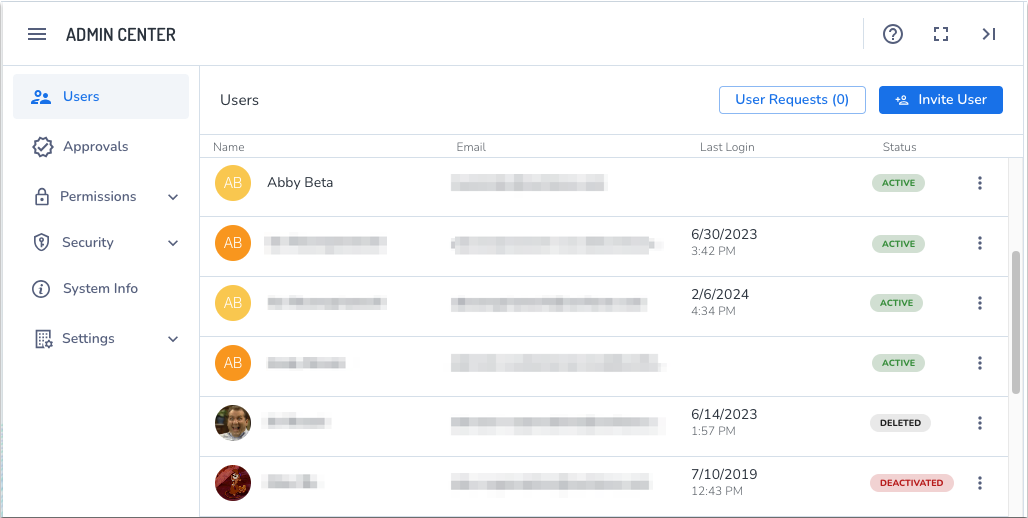
Left sidebar
The following options are available in the left sidebar:
- Users: Displays the list of users in this organization, and allows administrators to invite and review pending user requests to join the organization. To manage, see Manage users Admin Center.
-
Approvals: Lists any packages that have requests to be shared outside the organization and lets administrators approve or reject them.
-
Permissions: Allows administrators to set Object Level Permission (OLP) to provide a fine-grained access control model for objects in aiWARE instances. Set up Groups and Permission Sets, then use the System Access section to assign each group to a permission set.
- Security:
- API Tokens: Displays a list of all API tokens that have been generated for the organization, and allows administrators to create, edit, and revoke them.
- IAM: Lists existing OIDC methods, and allows you to create new ones. This enables organizations to customize the login process to align with their business identity and security structure.
- System information: Displays system information for the instance, including OS updates and version release notes. For more information, see View system information and release notes.
-
Settings: Lets administrators add a logo for the organization, and edit the organization’s name.



