The Instance Admin Center utility in aiWARE provides the highest level of administrative functionality for the creation and management of all organizations in a given environment. This includes the creation of organizations, viewing and managing all users in an environment, and system settings for each organization.
Note that there are differences in permissions between Instance Admin Center and Admin Center.
| Utility | Description |
|---|
| Instance Admin Center | Allows global admin control in an instance, which includes viewing all orgs, users, and managing them. |
| Admin Center | Allows management of an organization by an Organization Admin. |
Common Instance Admin Center use cases
| Use case | Description |
|---|
| View all users | Instance admins can view and take action on all users in the instance in any org. |
| Impersonate users | Instance admins can impersonate any user in the instance to troubleshoot their account issues. |
| Create and set up organizations | Instance admins can create and provision the initial packages available to the organization. |
| Manage system settings | Instance admins can manage and set system settings for the organization. |
Terminology
| Term | Definition |
|---|
| aiWARE instance | An aiWARE instance refers to either a single node running aiWARE, or, in multi-node installations, to the entire set of nodes running any parts of an aiWARE stack. |
| Impersonation | The act of impersonating a specific user account in order to help troubleshoot user issues |
| Organization | An entity that centrally controls access to different resources and assets. An aiWARE organization controls access to resources for AI processing, such as media files or other data assets, and processing tools, including engines, applications, schemas, and flows. |
Access Instance Admin Center
To access the Instance Admin Center utility, log in to your aiWARE administrative account. You will need a superuser account, which is only available to the root organization of each instance. From the header bar, select  and then Instance Admin Center
  .
.
Instance Admin Center slides out as a panel.
Interface overview
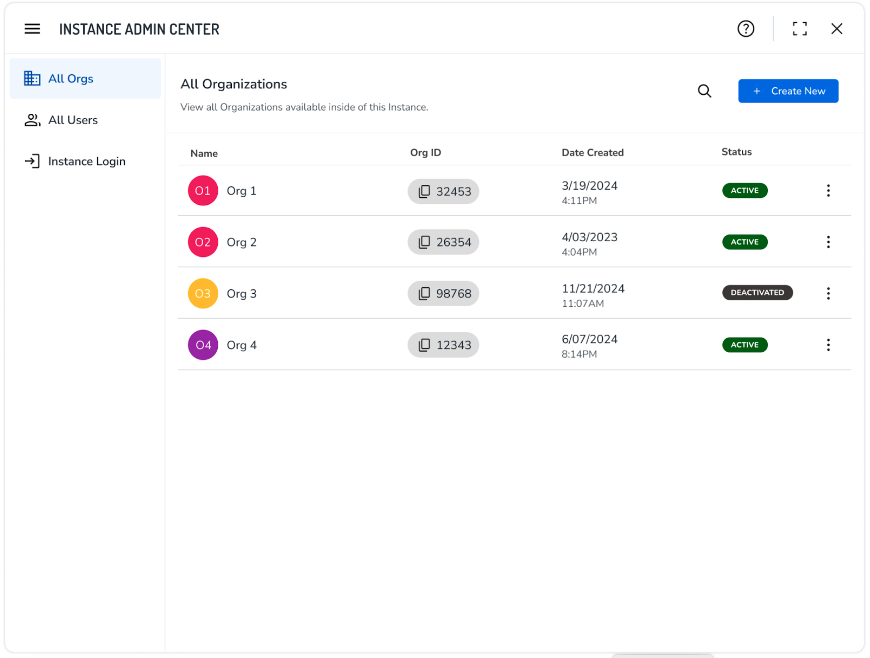
Left sidebar
The following options are available in the left sidebar:
-
All Orgs: Displays the list of all organizations in the instance.
-
All Users: Displays the list of all users in the instance.
-
Instance Login: Allows the Instance Admin to create branded log in pages for the environment.
Actions



