Within the Data Center utility you can create and manage the data sources to be used for data ingestion. When you create a source, you are specifying two things:
- The information needed to access the data you want to import into your account. Examples include stream URLs for radio or TV stations, YouTube channel addresses, podcast or RSS feeds, or even credentials for accessing information from an external cloud drive.
- (Optional) One or more content templates that will add structured metadata to each file that is imported via the source. Examples of content templates include Nielsen data for broadcast media, or technical specifications such as aspect ratio, frame rate, or video encoding format.
Access Data Center
To open Data Center, click the utility icon  . Select the Data Center folder icon
  . The Data Center panel slides out.
Create a new data source
Steps
-
Click New > Source. The Source Creation panel opens.
- Enter a Name, and optionally enter a Description and/or image for the source.
- Select a Source Type. The Source Type determines what additional information is accepted or required for the source. For example, all TV and radio sources require additional information such as genre, call sign, band, time zone, the URL, and owner information. Optional fields include market information, network affiliation, station website address, etc.
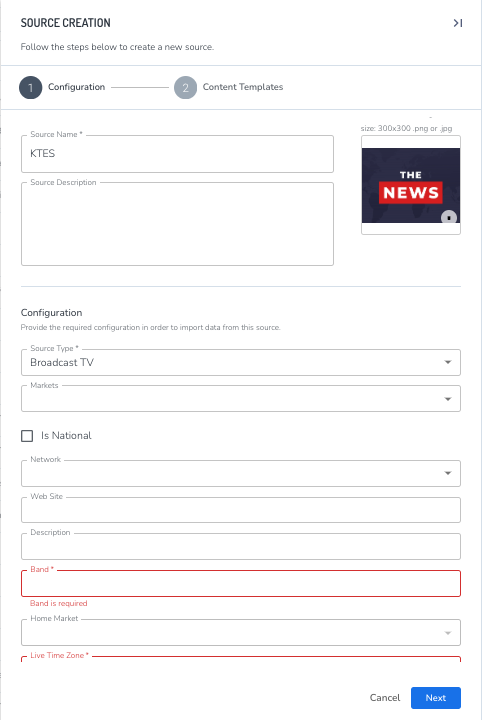
- Complete all the required fields (indicated by an asterisk), optionally complete the non-required fields, then click Next. The Content Templates section opens.
-
(Optional) If any content templates are available to your organization, use the Content Template pulldown to select one and add it to your list of templates. You can repeat this to attach more than one template.
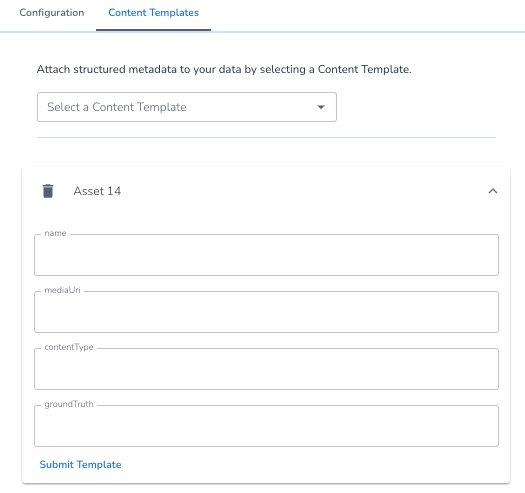
- (Optional) For each content template you have attached to the source, do the following:
- Click on the template to open the edit fields.
- Complete the form data.
- Click Submit Template.
- Click Save.
The source will now be available in the Sources list in Data Center.
What to do next
To begin ingesting content from the source, Create a scheduled job.



