Using Veritone’s Attribute Pixel technology, broadcast radio can track a client's web traffic and visitation with granular time and geo-data fidelity, serving as a viable replacement for Google Analytics data.
Before you begin
- Pixel installation needs to occur at least 48 hours before campaign launch (i.e. campaign start date). This ensures there will be web data at least to the start of the campaign start date. If possible, we recommend requesting and installing the pixel at least 2-4 weeks in advance though to ensure historical visitation data and analytics accuracy.
- Have already created a new advertiser.
[Note]Pixel is only available to Veritone customers in the US.
Steps
-
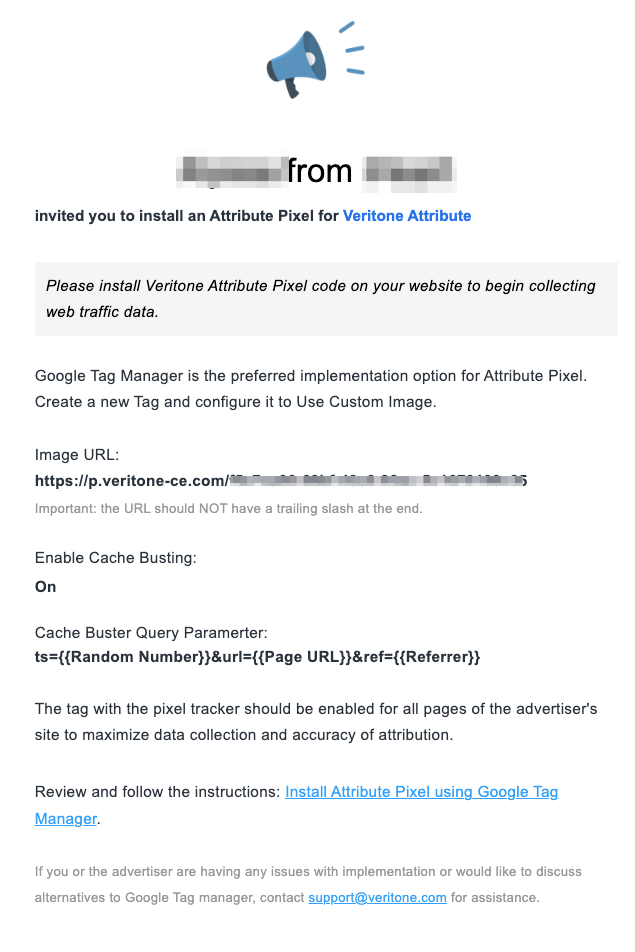
Your advertiser receives the email.
Once you have created an advertiser, your advertiser will receive an email that looks like the example below:
-
Your advertiser installs Attribute Pixel using Google Tag Manager.
Once your advertiser receives your connection email, guide them to complete the website installation process. You can install via Google Tag Manager or via direct install.
-
Validate implementation
Once installation is confirmed from your advertiser, you will receive a confirmation email. Log in to Attribute to validate web traffic is being collected.
[Note]Pixel web data can take up to 24 hours to reflect in the application UI after date/time of deployment.
-
Campaign creation
Set up Attribute campaigns in the UI.


