Textbox processes text and performs natural language processing, sentiment analysis, and entity and keyword extraction, allowing you to build tools that programmatically understand the content of text. Textbox has a variety of utilities:
- Understand if a comment is positive or negative
- Discover any people mentioned in unstructured data
- Build email auto-responders that automatically reply with the right answers
- Extract and handle dates and times (like "yesterday", or "next Tuesday")
- Get a list of the most significant keywords from a series of tweets
- Analyze customer reviews to discover up and down trends in sentiment
Capabilities
Textbox analyzes a block of text and discovers the following items:
- Sentences - Extracts each sentence from a body of text
- Sentiment - Indicates whether a sentence is positive or negative
- Entities - Extracts people, places, organizations, dates, and times, etc. for each sentence
- Keywords - Returns the most significant items mentioned in the text
Text analyzer tool
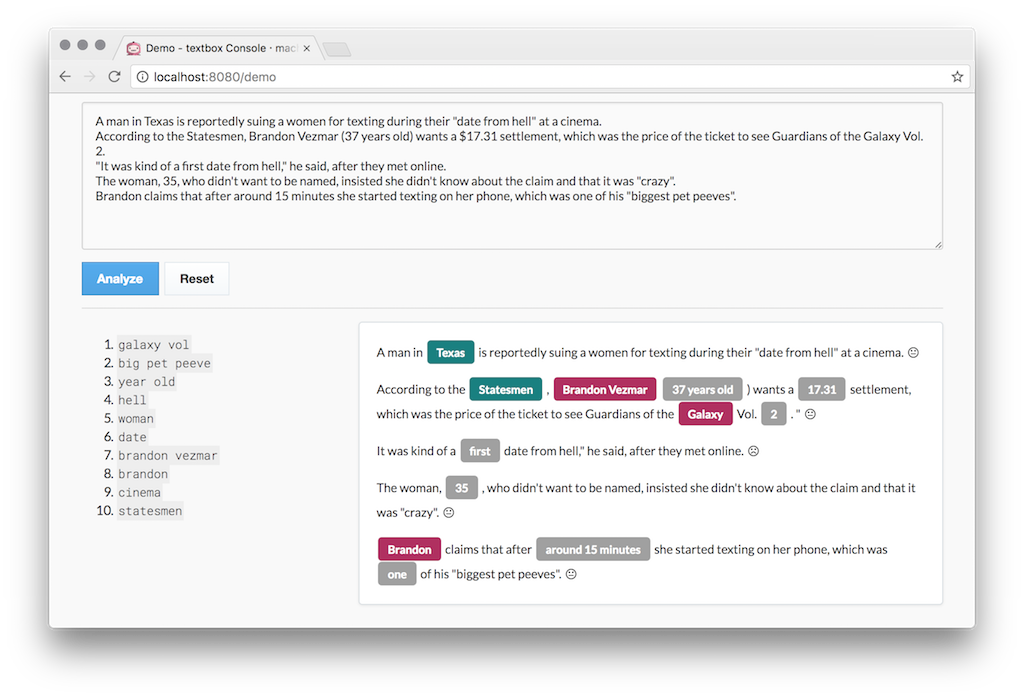
Textbox ships with a live text analysis tool that shows you the true power of what can be achieved.
Run Textbox
- Make sure you have Docker running with at least 2 CPUs and 4GB RAM.
- Run this code in your terminal to start the box:
MB_KEY="YOURKEYHERE"
docker run -p 8080:8080 -e "MB_KEY=$MB_KEY" machinebox/textbox
- Go to http://localhost:8080/ in your browser to see what your box can do.
Updating Textbox
If you already have Textbox installed, you can update it with the following:
docker pull machinebox/textbox:latest



