Two status definitions - Warning status  and Error status
  notify you when your advertiser with an active campaign is experiencing a lack of new web data. These statues are indicators prompting proactive action to assist your advertiser in resolving the issue.
Warning advertiser status
An advertiser with an active campaign that has not received any new web data from its web connection within 3 hours.
Steps to take when you see a warning status:
-
Check connection details and test the connection. On the connection details screen, advertisers with a status will see a TEST CONNECTION button. Click to check the connection status.
-
Monitor for 24 hours. Depending on the typical web traffic patterns for the advertiser’s site, a temporary decrease in visits may be normal and may resolve itself.
-
Communicate with the client. If the warning status remains for more than 24 hours, confirm with your client that no changes were made to the website.
-
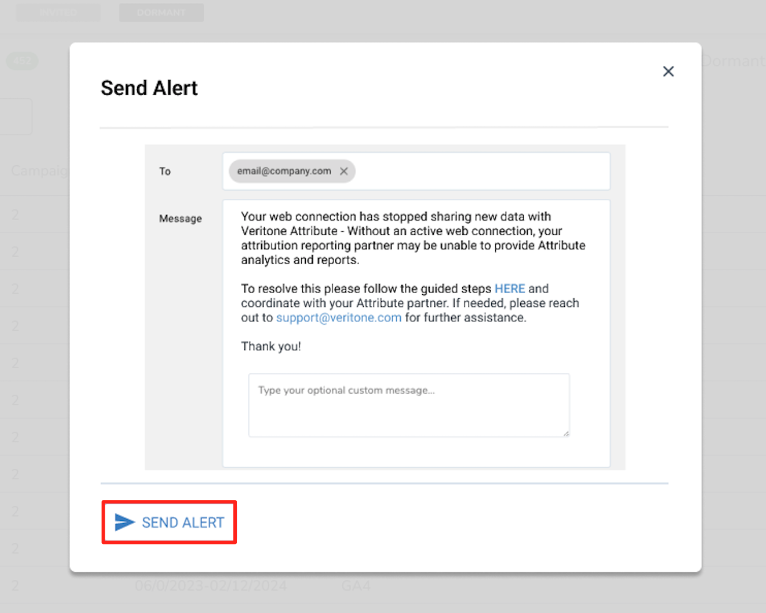
Send an alert: If the warning status persists, you can now alert your advertiser. On the Active Status Details screen, all advertisers with a warning or error status will see have the option to Send Alert. Use this to directly send your advertising partner a notice of this issue with linked instructions to assist on resolving.
Click the Send Alert button to bring up a pre-populated message that you can then send to your advertiser notifying them about the ongoing issue.
Error advertiser status
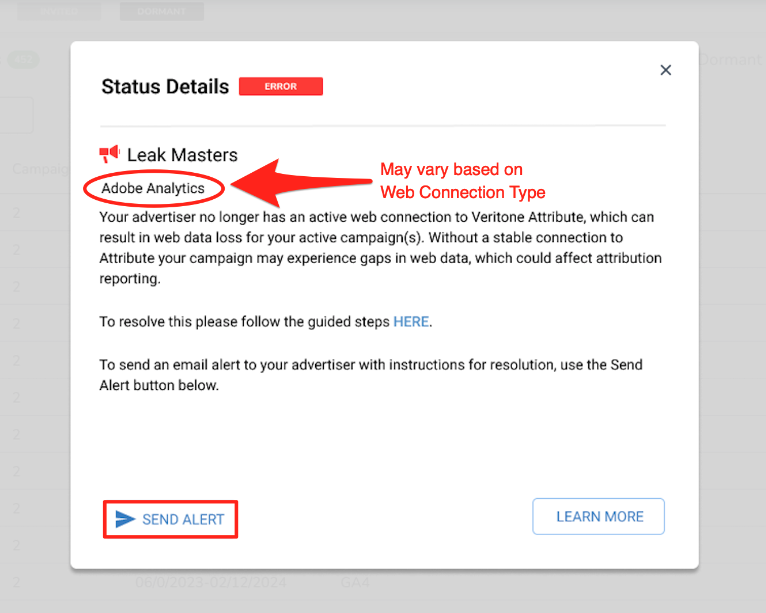
A red error status indicates an advertiser with an active campaign(s) that has not received any new web data from its web connection source in 48+ hours.
Steps to take when you see an error status:
-
Communicate with the client. If the error status remains for more than 48 hours, we recommend you confirm with your client that no changes were made to the website.
-
Send an alert. If the error status persists, alert your advertiser. On the Active Status Details screen, all advertisers with a warning or error status will see a SEND ALERT button in the bottom left.
-
Troubleshoot the connection. See Troubleshoot invited advertiser issues for more information.


